
Go to documentation repository


Page History
To generate the Axxon OneFree license file, follow these steps: Free 라이선스 파일을 생성하려면 다음 단계를 따르십시오.
- 다음 주소의 웹 서버로 이동합니다: Go to the web server at the following address: https://sale.axxonsoft.com/sale/.
- Go to the link: Activate Free.
- In the form that appears on the page, specify the path to the saved activation request file.
- Click Generate key.
- Download the license file license.key.
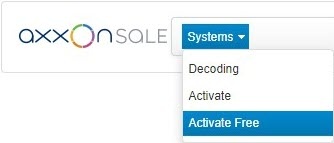
- 링크로 이동합니: Activate Free (Free 활성화)
- 페이지에 나타나는 양식에서 저장된 인증 요청 파일의 경로를 지정합니다.

- Generate key (키 생성)을 클릭합니다.
- 라이선스 파일(license.key)을 다운로드합니다.
Axxon One Free 라이선스 파일 생성이 완료되었습니다The generation of the Axxon One Free license file is complete.
Overview
Content Tools