
Go to documentation repository


Page History
| Section | |||||||||||||||||||||
|---|---|---|---|---|---|---|---|---|---|---|---|---|---|---|---|---|---|---|---|---|---|
|
Language settings in the OS
...
Before installing you install Axxon PSIM in any language with any configuration (Server, Client, or RAW Remote administrator’s workstation), make sure that appropriate language and regional options are set in the OS. Do the following:
- Go to the Start – menu → ControlPanel– Regional and Language Options menu. The Regional and Language Options window is displayed → Clock, Language, and Region. The language settings window opens.
Go to the Formats tab. Make sure that the language that is used for Axxon PSIM installation is selected in the Format dropdown drop-down list. If not, then change the parameter value.

Note title Important! If English is you want to be in use , then '.' is to be specified English, you must specify the "." (period) as the decimal symbol.
Specify '.' To specify "." (period) as the decimal symbol as follows, do the following:
a. Select English language in the Format dropdown In the Format drop-down list (1), select English.
b. Click the Additional settings... button (2) button and make sure the '.' the "." (period) value is selected for in the Decimal symbol (3) parameter in the Numbers tab. If not, then change the parameter value manually.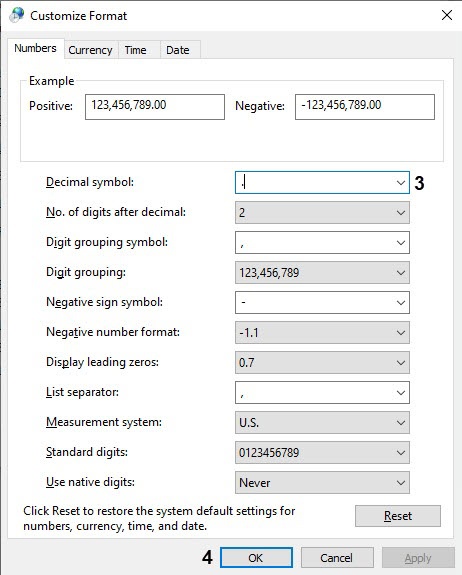
c. Click Click the OK button (4).
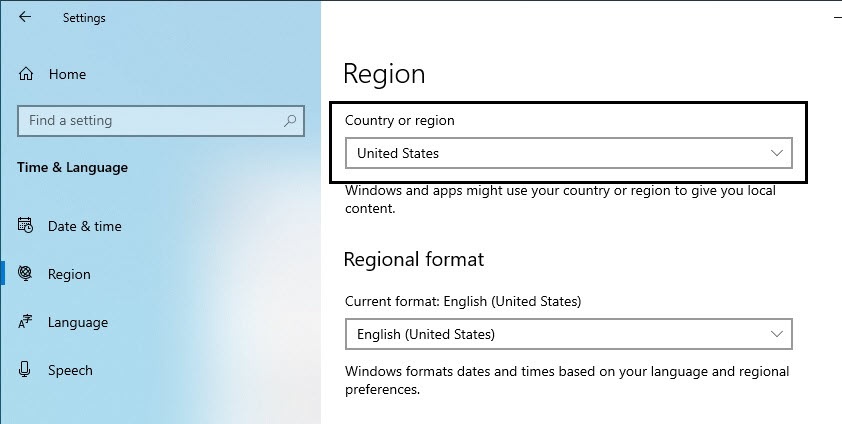
d. Click the OK button (5).- Go to the Region tab. Make sure that the real computer location is selected in the Current location dropdown Country or region drop-down list. If not, then change the parameter value.
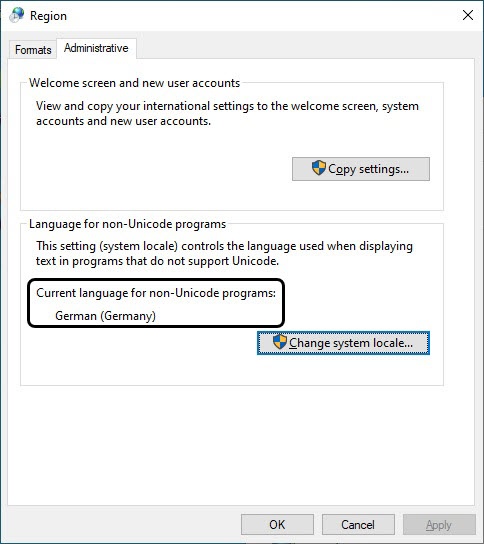
- Go to the Administrative tab. Make sure that the language that is used for Axxon PSIM installation is specified in the Current language for non-Unicode programs field. If not, then change the parameter value using the Change system locale... button.
System settings
Before starting you start the installation of Axxon PSIM software installation, make sure that the name of the computer it is installed you are installing on does not not exceed 15 characters. If the computer name is longer than 15 characters, the installation will not complete correctly. Rename the computer.
...
Overview
Content Tools