
Go to documentation repository


Page History
To provide the operation of the distributed system, you must configure the interaction between Serversservers, Remote Administrator’s workstations, and Remote Clients. The interaction between Serversservers, Remote Administrator’s workstations, and Remote Clients means the database replication (for Servers servers and Remote Administrator’s workstations only) and the event exchange. During configuration, you must specify for each Serverserver, the Remote Administrator’s workstation and , and the Remote Client the lists of interacting and non-interacting Serversservers, Remote Administrator’s workstationworkstations, and Remote Clients.
You can configure the interaction of the surveillance system components from components from the administration Server server or, if there are dedicated subnetsallocated subnetworks, from the node Server server or the Remote Administrator’s workstation.
To configure the interaction between the distributed surveillance system components, do the following:
- Go to the Architecture tab in the System settings dialog window (1).

The Computer column displays the list of network names of Serversservers, Remote Administrator’s workstations, and Remote Clients registered in on the Hardware tab (2). In the Computer column, left-click the cell where the network name of the Serverserver, the Remote Administrator’s workstation, or the Remote Client is specified and for which you want to change its the interaction settings with any server, the Remote Administrator’s workstation, or the Remote Client. Text in the selected cell becomes grey.
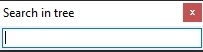
Info title Note To search for a computer by name, use the Ctrl+F keyboard shortcutkey combination. The Search in tree window opens, where you must enter the full computer name fully or its part partially and press the Enter button. Found The found computer is highlighted in grey in the list.
- The With computer column displays the list of those Servers, Remote Administrator’s workstations, and Remote Clients, with which the selected Serverserver, the Remote Administrator’s workstation or , or the Remote Client is able to can interact (3).
In the IP address column column, specify the addresses of the computers to which you are connecting want to connect (4). Features:
By default, you must specify the IP address. If , but if the DNS instead of IP allowed checkbox is set on the settings panel Programming tab of the the Security zone object in the Programming tab object settings panel, you can specify the DNS name instead of the IP address.
If computer addresses in the network are set automatically (DHCP is configured), then you can leave the the IP address field blank.
- If the computer name is correct, then the IP address can be filled in automatically. For this, enter the question mark "?" in the the IP address field and press the Enter key on the keyboard.
- You cannot add computers with the same IP addresses, ; a warning message appears if you try to do so:
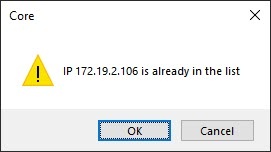
If the entered IP address is already assigned to some computer in the system, the address is assigned to the added computer, and the address of the computer that previously had the address is reset.
If you want to set the specified IP address must be set for all connections with this computer in the distributed system, right-click in the the IP address field and select field, and in the menu that opens, select Replace <Computer name> with <IP-address> connections in the menu. This is allowed . You can do it if computers with one network interface are used in the distributed system, and the specified IP address must be used to communicate connect with these computers.
Note title Attention! When you click the Apply button (see step 10), the changes are saved only for the current computer. In order for To save the IP address to be saved described above for all computers in of the distributed system, click the Apply button pressing while holding down the Ctrl key on the keyboard. If the checkbox is set in the cell that crosses the Connection column and in the row corresponding to the Server, server or the Remote Administrator’s workstation or Remote Client is set, then , it means that the data on about system configuration parameters of the selected Server, server or the Remote Administrator’s workstation or Remote Client is exchanged with any Server, server or the Remote Administrator’s workstation or Remote Client is exchanged (5). To prohibit exclude the exchange of configuration data parameters with the selected Server, server or the Remote Administrator’s workstation or Remote Client, clear the corresponding checkbox in the Connection column.
Info title Note Server or the Remote Administrator’s workstation always exchange always exchanges the configuration parameters with the Remote Client, even if the regardless of whether the Connection checkbox is clear set for this Remote Client or not. If the checkbox is set in the cell that crosses the Send events column and in the row corresponding to the Server server or the Remote Administrator’s workstation is set, then it means that events are exchanged between the selected Server server or the Remote Administrator’s workstation and and any Server server or the Remote Administrator’s workstation are exchanged (6). To prohibit event exclude the exchange of events with the selected Serverserver, the Remote Administrator’s workstationor Remote Client, clear the corresponding checkbox in the Send event column.
Info title Note Server or the Remote Administrator’s workstation always exchange configuration parameters with always exchanges events with the Remote Client, even if the regardless of whether the Send events checkbox is clear set for this Remote Client or not. Info title Note In order to To set all checkboxes in the Connection or or the Send events columns column, highlight select a cell in the required column and press Ctrl+A. To clear all checkboxes, highlight select a cell and press Shift+A. - If modems are used you use a modem for connecting the distributed system components, then fill in the the Connection, User, and Password fields in the properties of the the Computer object on the Hardware tab according tab according to the settings of the Windows modem configuration usedconnection used (the connection name, login, and password, respectively).
- Repeat steps 2-6 for each pair of Serversservers, Remote Administrator’s workstations, and Remote Clients.
- Click the Apply button.
Interaction of Configuring the interaction between the distributed video surveillance system components is now configuredcomplete.
Let’s consider setup of a Server and For example, let's consider the configuration of the server and the Remote Client connection via videogate as an example. A the video gate. The diagram of interaction of relevant components the components' interaction for this example is shown in the figure.
| Info | ||
|---|---|---|
| ||
Videogate is used in large distributed video surveillance systems and designed for routing the video signals between Servers servers and Clients clients located in different subnetworks. For more details, see General information on the videogate. |

According to the diagram , shown in the figure above, interaction must be disabled you must exclude the interaction between the Server server (SERVER1) and the Remote Client (MN1). As a result, the the Architecture tab displays the following configuration parameters:
- For the videogate video gate (GATE), the interaction must be set with the Server server (SERVER1) and with the Remote Client (MN1).

- For the Remote Client (MN1), the interaction must be set with the videogate video gate (GATE), and the interaction with the Server server (SERVER1) must be disabledexcluded.

- For the Server server (SERVER1), the interaction must be set with the videogate video gate (GATE), and the interaction with the Remote Client (MN1) must be disabledexcluded.

In Axxon PSIM, the Computer object corresponding to the Remote Client (MN1) isn't displayed on the Hardware tab of the System settings dialog window on the server (SERVER1).
However, if you set the Send events checkbox (the Connection checkbox is clearmust be cleared), the Computer object corresponding to the Remote Client (MN1) is displayed on the Hardware tab on the Server (SERVER1), but it is marked with the  icon, and the object name is highlighted in grey color. It means that administration of the given object is forbidden.
Overview
Content Tools