
Go to documentation repository


Page History
The Backup audio archive program module is designed to create a backup copy of for creating backup copies of the audio archive recorded synchronously with a the video archive. When you use the Backup audio archive program module is in use , the audio archive recorded synchronously with the video archive from selected the specified cameras included into in the digital video monitoring surveillance system is copied to a storage selected while configuring the storage specified during the configuration of the Backup archive module object (see the Selecting disks to store the archive of the Backup archive module section). Copying is performed synchronously with a the video archive copying.
Configuration of To configure the Backup audio archive is performed using program module, use the Backup audio archivesystem object. The Backup audio archive object is created automatically while creating automatically created when you create the Backup archive object.
| Info | ||
|---|---|---|
| ||
| Deleting When you delete the Backup archive object, the Backup audio archive object is automatically deleted automatically. |
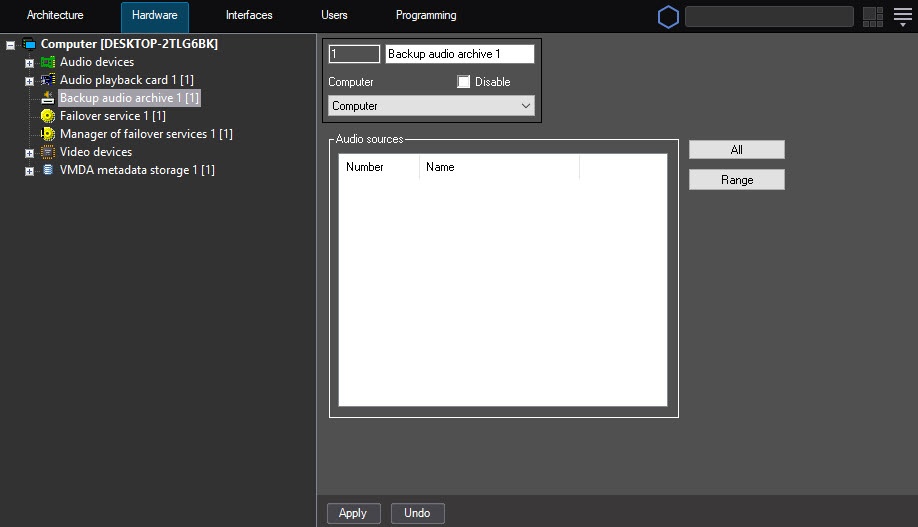
To configure the Backup audio archive module, do the following:
- Go to the settings panel for the Backup audio archive object.
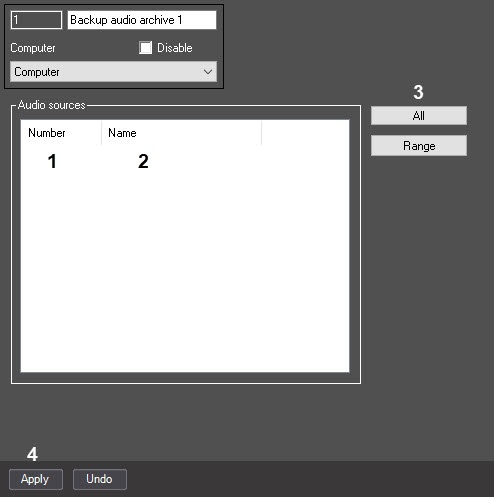
- In From the Number drop-downlistdown list (1), select the ID of a microphone related to microphone ID that is linked with the camera, the archive from of which is you want to be moved transmit to the backup archive (1).
Left-click in the the Name field (2). It will be is automatically filled in with the name of the selected microphone (2).
- Repeat steps 2-3 for all required microphones.
Info title Note . To add all Microphone objects created in the system to the list, click the All button (3)
.Repeat steps 2-3 for all required microphones.
- Click the Apply button (4).
It is possible to You can add microphones to the list in a single package. To perform itbulk. For this, do the following:
- Click the Range button.
As a result, the Add/Edit window will openopens.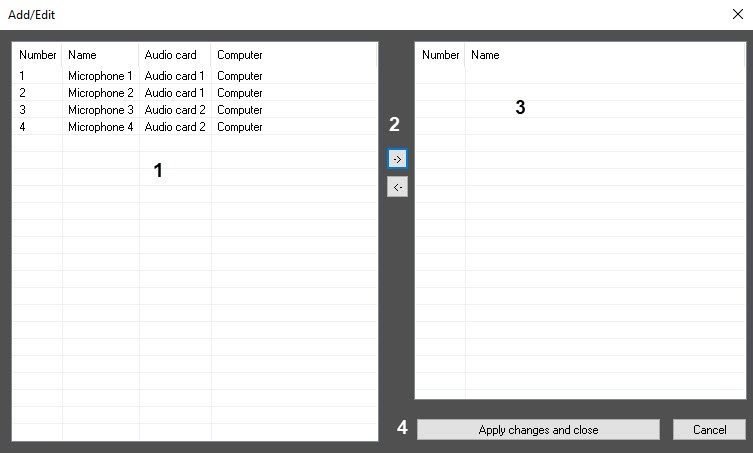

- In the left part of the list, select required the required Microphone objects using the left mouse button (1). Use If necessary, use the Shift and Ctrl keys to select several objects simultaneously.
Click the ->
button (2) toreplace move selected objects to the right part of the list (3).Info title Note. To replace move objects from the right part of the list to the left part, select microphones in this list and click the <-  button (2).
- Click the Apply changes and close button (4).
Microphones from the right part of the list will be added in (3) are added to the list on the settings panel of the Backup audio archive object.
The Configuring the Backup audio archive module is now configuredcomplete.
Overview
Content Tools