
Go to documentation repository


Page History
The To configure the numbers of the Axxon Axxon PSIM's SIP-terminal are configured as follows, do the following:
- Go to the Numbers settings tab on the settings panel of the SIP-terminal object (1).
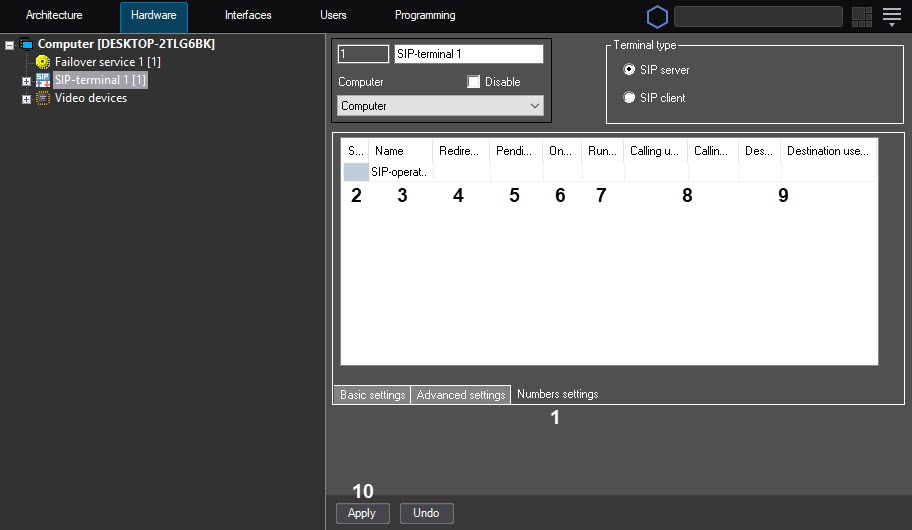
The Subscriber column (2) lists the numbers of all devices and operators registered on the SIP-terminal, as well as special numbers.
The Name field (3) lists the names of the corresponding devices, operators, and special numbers.
In the Redirecting field (4), enter the number to which the corresponding subscriber's calls should must be forwarded to. Several numbers can be specified separated with semicolon allowing the call redirection to several devices or operators. This option enables conference callsYou can specify several numbers separated by a semicolon. In this case, redirection is performed on all specified devices and operators. Thus, the group call is created.
Note title Important! Attention! We highly don't recommend setting the redirection of subscribers to yourself, that is, specifying the same number in the Redirecting field as in the Subscriber field. In this case, the system can operate incorrectly. If you try to save the settings of the subscriber redirection to yourself, the warning window is displayed:

To clear the Redirecting field of subscribers with the incorrect setting, click the No button. To proceed with the configuration without changes, click the Yes button
It is strongly not recommended to redirect subscribers to themselves, i.e. specify the same number in the Redirecting and Subscriber fields. The system may not work correctly in this case. When trying to save settings with some subscriber redirected to itself, a warning window appears:
Click No to clear the Redirecting field for affected subscribers or click Yes to continue configuration without changes.
In the Pending, sec field (5), enter the time period in seconds , during which it is necessary to you must wait for a response from the subscriber. If you don't specify the value is not set in the field, it this value is defined set by the CallTimeout registry key ; and by default is 30 sec . by default (see see Registry keys reference guide). The If you specify a value greater than set by CallTimeout will not be applied, i.e. the least of in the CallTimeout key, then it isn't applied, that is, the lowest value specified in the Pending, sec field and the CallTimeout key is selected used as a timeout.
- If you specify several numbers were specified in the Redirecting field , and want only one operator or device or operator should be able to answer the to accept a call, set the checkbox in the One responder checkbox field (6). When the checkbox is not set, the call can be answered by any and all devices and/or operators as per the redirecting list; this is the way to implement conference calls. When the checkbox is set, the call comes to all devices and/or operators until any one of them answers it to end the call for all the other devices and/or operatorsIf you clear this checkbox, then several operators and devices can accept one call, and thus you can create the group call. If you set the checkbox, a call keeps coming to operators and devices until one operator or device accepts it, after which this call is declined for others.
From the Run macro drop-down list (7), select the Macro object, which should must be run when calling you call the subscriber. See also Creating and configuring Macro events and Macros for working with SIP-terminal.
In the Calling number multicast user multicast (videosound) / Calling number multicast user multicast (audiovideo) fields (8), specify the IP address for broadcasting the video stream and audio stream from the calling device in the "multicast" mode.
- In the Destination number multicast user multicast (videosound) / Destination number multicast user multicast (audiovideo) fields (9), specify the IP address for broadcasting the video stream and audio stream from the destination device in the "multicast" mode.
- Click the Apply button (10).
The Configuring the numbers of the Axxon PSIM's SIP-terminal are configured.is complete
Overview
Content Tools