
Go to documentation repository


Page History
| Section | ||||||||||||||||||||
|---|---|---|---|---|---|---|---|---|---|---|---|---|---|---|---|---|---|---|---|---|
|
...
Principle of
...
logic operation
The Logic of event handling processing logic is a sequence of actions that must be performed by an operator the operator must perform when processing an event in the Incident incident manager.
Six Seven elements are used to perform actions:
- Image. The operator can add a frame from a camera or an arbitrary image to the report. Images from maps or cameras can be added automatically.
- Button. The button can be used to close the event handling interface and/or to open a report.
- Combobox. The operator can select any values from one or several lists.
- Comment. The operator can add a comment while handling processing an event.
- Radio button. The operator can choose select one of the suggested values.
- Checkbox. The operator can set one or more checkboxes.
- Date/time. The operator can set the accurate date and/or time of the processed event.
The number of elements that can be used in the Logic logic and the number of actions that the operator must perform are not limitedunlimited. After the operator performed performs any action, the next action that must be performed the operator and, if necessary, a macro must perform is specified in the element settings; a macro can be executed as well, if necessary. The sequence of actions can be determined by the operator's actions selection in the previous steps.
If there are several Logicslogics, you must create and configure each Logic logic separately.
Creating
...
logic
To create a Logiclogic, go to the settings panel of the Incident handler object, select the Logic tab, and create a Logic logic in one of the following ways:
- create Create a new Logiclogic: click the + button (2) and , and in the window that opens, enter the name for the new logic (8).
- create Create a copy of an the existing logic: select the select a logic in the list (4) and click the Create copy button (1). The name of the new logic consists of the name of the original logic and the copy number in brackets. For example, for the Logic 1 object, the first copy will be is named Logic 1(1), the second copy will be is named Logic 1(2).

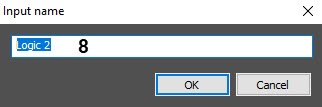
As a result, the new logic appears in the list (4).
Configuring
...
logic
For the Logic logic to work, you must add elements to it and configure each of them, as well as set the order in which elements are displayed for the operator:
- In the list of Logics logics (4), select the Logic logic you want to configure.
- Add the required number of elements to the Logic logic (5). To add a row to the table, select the last row and press the ↓ key on the keyboard. To delete rows from the table, use the Ctrl + Del key combination.
- In the Element ID column, enter the name of each element.
- In the Multitasking column, set the ability to switch to processing other events when while processing one event is processed while , being on the selected Logic logic element:
Select Deny , so that when this element appears, the operator cannot switch to processing another event until the operator moves to the element with the Allow value or completes processing the an event (default value);.
Select Allow, so so that when this element appears, the operator can proceed to processing another event.
- In the Edit column, set the ability to step back when processing an event, being on the selected logic element:
- Select Deny so that the operator cannot step back when processing an event.
- Select Allow so that the operator can step back when processing an event.
Select the element that is element that will be displayed first for the operator when processing the an event. To do this:
- Select an element in the table.
- Click the Edit button (6).
- In the Starting element drop-down list, select the Yes value.

Click the OK button.
As a result, a check mark will be the checkbox is displayed next to the selected element in the Starting column of the element table.Info title Note If you don't select the starting element is not selected, then it will be is the first element in the list.
- Configure each element of the Logic logic and their cooperation connection (see Configuring the elements).
- Click the Apply button (7).
Configuring a Logic logic is complete.
Resetting
...
logic for processed events
If the administrator has created an incorrect or incomplete Logic logic and wants to update or edit it, it is possible to you can reset the event processing jobs handling processes with this Logic logic for operators so that the updated Logic logic is applied to the event. To do this, after you edit the Logic, set change the logic settings by setting the Apply to processed events check box checkbox and click Apply:.
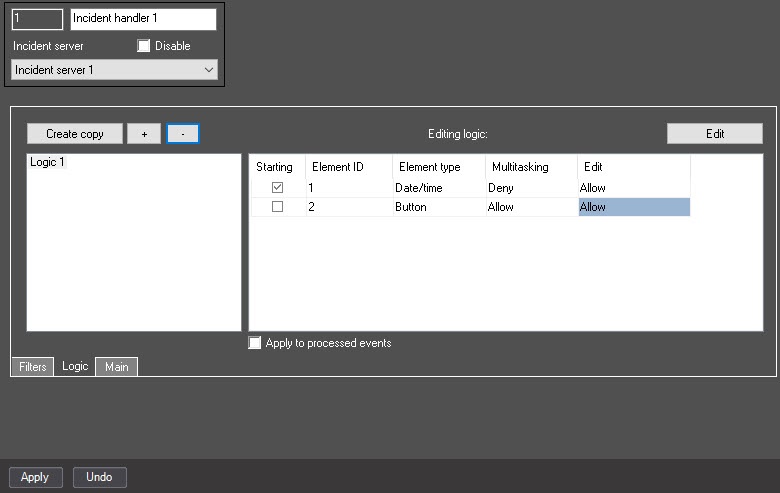
As a result, the current event processing jobs with this Logic will be logic is reset for operators, and you can start the event processing can be started over again with the updated Logiclogic.
Example caseof applying the reset option: the administrator has created a two-step Logiclogic, in which the second step is a Button the button without the set Finish parameter set and with Multitasking disabled multitasking for this Button button (see see Configuring the button). It is impossible to complete You cannot complete the event processing with such Logiclogic. In this case, the administrator can edit allow multitasking for the Logic by enabling Multitasking for the Button, then set the button by setting the Apply to processed events check box checkbox and click clicking Apply. As a result, the events processed with this Logic will be logic are reset to the Waiting for handling status, and the operators will be able to can restart the event processing with the updated Logic logic (see Events control and processing Control and handling of events using the Incident incident manager).
Removing
...
logic
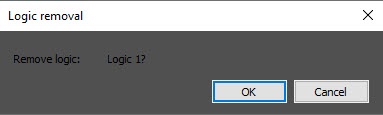
To remove a Logiclogic, select it in the list of Logics logics (4) and click the - button (3). In the window that opens, confirm the removal:.
| Info | ||
|---|---|---|
| ||
The Logic logic of event handling processing is applied to an event at the moment when the event gets into the Incident incident handler and is displayed in the Incident incident manager. Accordingly, if you change the Logiclogic, the updated Logic will be changed logic is applied to the events that occurred after it was changed. If a the group event processing of the events is enabled, the updated Logic will be logic is applied to a the new group of the events after the existing group is closed. |
...
Overview
Content Tools