
Go to documentation repository


Page History
To delete an object from the tree, hover the mouse cursor over the object it, and after you open the context menu. Select , select the Delete object menu item. A dialog box asking you to confirm the deletion As a result, the dialog window requesting the confirmation of the system object will opendeletion is displayed on the monitor screen.
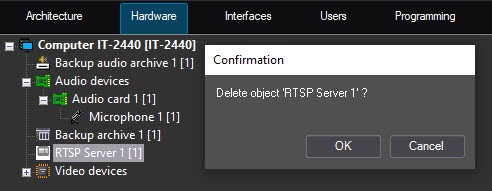
To To confirm the object deletion, click the the OK button. To cancel the deletion, click the Cancel button. As soon as deletion is confirmed, the system object, as well as all its child objects, will be is deleted.
The delete system object function applies to all objects, including the Computer object, created by default when Axxon PSIM is installedduring the installation of Axxon PSIM.
| Info | ||
|---|---|---|
| ||
Note that after deleting a you delete the parent object, like the Computer object corresponding to the local computer, it will be is difficult to restore it. That is why it isnDue to this, we don't recommended recommend deleting objects the object, such as Computer Computer created by Axxon PSIM. |
Overview
Content Tools