
Go to documentation repository


Page History
Create To add and configure the the Audio card object as followsin Axxon PSIM, do the following:
- Go to the Hardware tab in the System settings dialog box window (1).
- Select Create object -> Audio card in the context menu of the Computer object (2).

As a result, the
basic settings toolbar is displayedmain object settings panel opens.
Info title Note Basic Main settings are set automatically.
It is possible to If necessary, you can change an ID, the object name, and the parent object.

- To create the object, click the Apply button.
- Select the created Audio card object in the object tree (1).
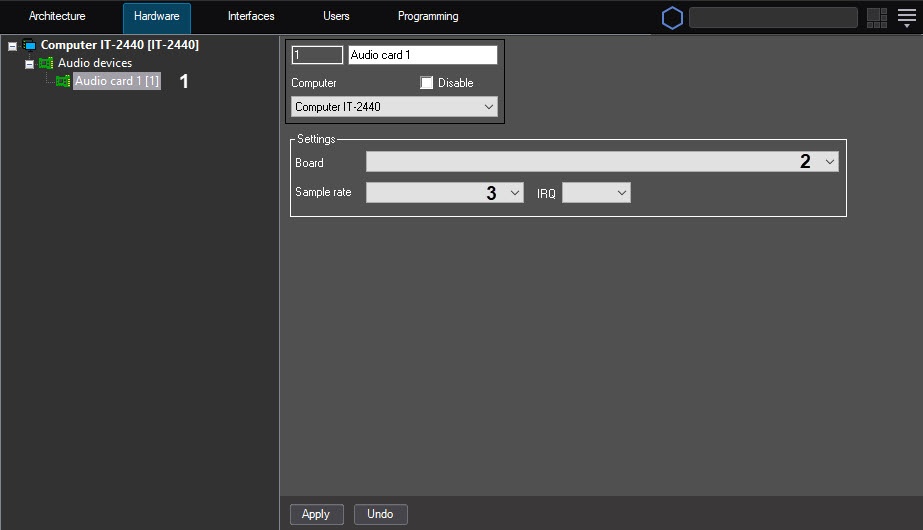
- Configure the created object.
In the Board list (2), specify the type and the PCI channel of the card. Between the Audio cards objects there is card objects, the PCI channels are allocated in the end-to-end allocation of PCI channels that starts with ‘0’order starting from 0.
In From the Sample rate list, select the audio sample rate (3).
Note title ImportantAttention! If the audio signal is received from the IP device, then the value selected in from the Digitization dropdown drop-down list is ignored. In this case, the digitization rate is set in the driver parameters on the Microphone settings panel of the Microphone object in the driver parameters (see Configuring audio acquisition from IP devices).
Info title Note Sample The sample rate for the SC510N4 (FX HD4, SA HD4—SA 7160PCI) card ( specified in the the Sample rate list ) is to must be the same as the sample rate on the video with which the audio signal is digitized by a camera. If the rate values are not aren't the same, then slow -/fast-motion or fast playback of the audio signal is possible.
Click the Apply button to save the changes.

Configuring
...
the Audio card object is
...
complete.
| Note | ||
|---|---|---|
| ||
To configure one physical video capture card the creation of , you may have to create several Audio card objects is required (see Features of audio subsystem configuration section). |
Overview
Content Tools