
Go to documentation repository


Page History
Create To create and configure the Microphone object as follows, do the following:
- Select Create object -> Microphone in the context menu of the Audio card object.
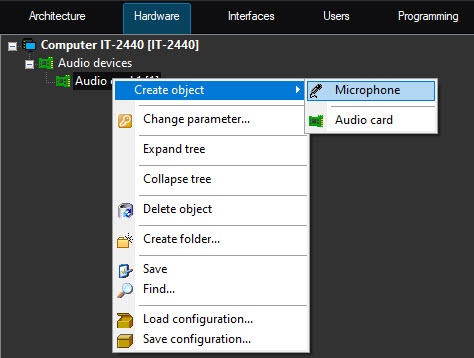
As a result, the
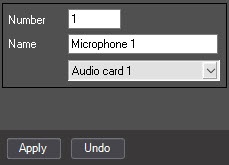
basic settings toolbar is displayedmain object settings panel opens.
Info title Note Basic Main settings are set automatically.
It is possible to If necessary, you can change an ID, the object name, and the parent object.

- To create the object, click the Apply button.
- Select the created Microphone object inthe object tree (1).
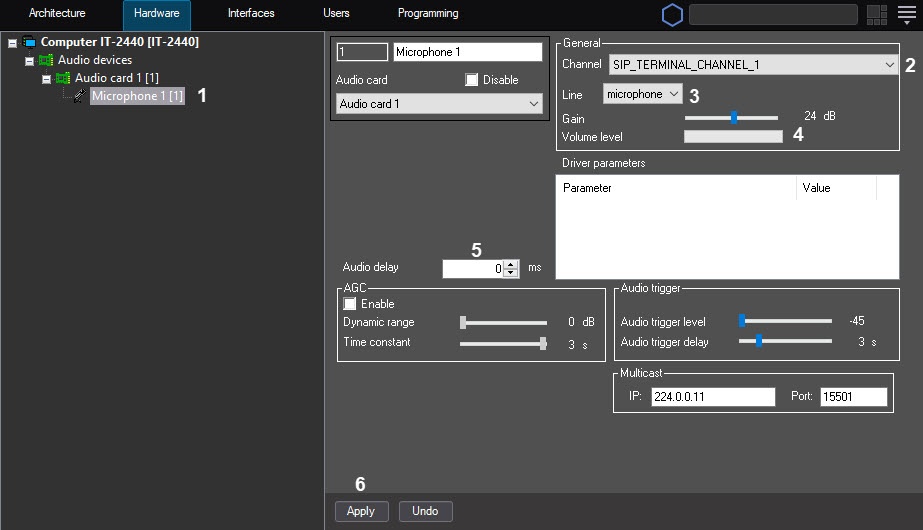
- Configure the created object.
In From the Channel list (2), select the channel to which the audio device is connected (see the Features of audio subsystem configuration section).
In From the Line list (3), select the device type (microphone, by default).
Configure the level of sound volume using the Increase Gain slider. Sound availability in the specific microphone and the increase value are in the In the Volumelevel graphic scale (4), you can determine the sound availability on the specific microphone and the set gain value.
- In the Audio delay (5) field, sets set the delay in milliseconds between the moment of receiving of an audio signal from the audio input device and the moment of its output to the speaker / recording to or the archive recording synchronously with the video signal. This parameter is used if the video image comes delayed or advanced, and the sound goes ahead of or behind of it. The You can set the value range is from -10000 to 10000.
Click the Apply (6) button to save the changessettings.
Configuring the Microphone object is completedcomplete.
| Info | ||
|---|---|---|
| ||
Number The number of the Microphone objects that can be created under oneAudio card object is specified in the Features of audio subsystem configuration section. |
...
Overview
Content Tools