
Go to documentation repository


Page History
The Script system object is used to initialize a script developed in the JScript language in in Axxon PSIM and to set the parameters for its execution..
The settings panel of the Script system object is shown in the figure below:

| Note | ||
|---|---|---|
| ||
Creating of If you create a large number of the Script objects (more than 100), it can cause system instability. |
The In the settings panel of the Script system object allows choosing , you can specify the time schedules schedule of the script execution and the computers (kernels) for executing the on which you want to execute a script.
| Info | ||
|---|---|---|
| ||
To set all checkboxes next to all computers, you must select a cell in the column with checkboxes and press Ctrl+A. To clear all checkboxes, select a cell and press Shift+A. |
The settings panel of the Script system object has the button for starting the the Editor-Debugger utility and the text window panel for viewing the script text created using by this utility are also located on the settings panel of the Script system object. You can edit the script in the the Editor-Debugger utility or directly on from the settings panel for the Script object.
MoreoverBesides, you can configure the events filter—the list of events that the Script system object will process. Including the processes. Entering an event to the filter equals is equal to the if operator in the script text of script, it meansthat is, when you specify the event is in the table, the operator can be omittedyou can omit this operator.
| Note | ||
|---|---|---|
| ||
You must configure set the events filter when you create a script in large distributed configurations. OtherwiseOtherwise, the module will process processes all incoming events and it will lead to module malfunctioningcan operate improperly. |
| Info | ||||||||||
|---|---|---|---|---|---|---|---|---|---|---|
| ||||||||||
If the Object’s Let's the Macro value is specified in the Object type column has the Macro value, of the table, the 1 value is selected in the Identifier column has , and the 1 Executed value and is in the Event column has the Executed value, then . Then, instead of the script below
you can use the following script:
The detailed For more information on about the elements of the the Script object settings panel for the Script object is given in , refer to Administrator's guide. |
| Info | ||
|---|---|---|
| ||
When you control Recording on Camera 1 must be started when controlling the PTZ camera in from the Video surveillance monitor, start recording on camera 1. For this, you must configure the the Script object as followsin the following way:
|
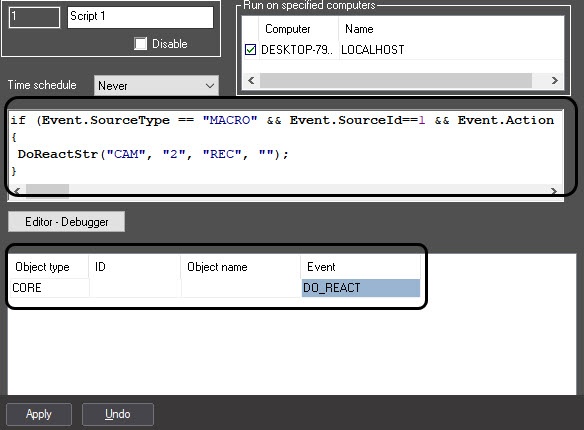

You can fill in this filter by using The filter can be set by the UPDATE_OBJECT event of the CORE object. Example of the command to add for adding the Camera object with identifier 1 to the filter of the Script object with identifier 2:
...
Overview
Content Tools