
Go to documentation repository


Page History
It is possible to run To start the idb.exe utility utility with keys. For this click , click Start → Run. Type In the window that opens, enter the path to the idb.exe utility (C:\Program Files (x86)\Axxon PSIM\Tools64\idb.exe by default) and the required key after the / in the appeared windowcharacter.

To display keys , supported by the utility, use the command «idb"idb.exe exe /?»" command.
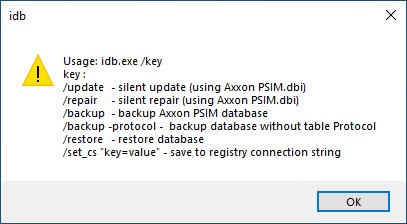
The idb.exe exe utility supports the run startup with the following keys:
- «/update» − the key of update—the key to running the hidden updating of database update (uses the psim.dbi file).
- «/sync» − the key of /sync—the key to the database synchronization with the data source of data.
- «/backup» − the key of backup—the key to running the process of creation creating the backup copy of the Axxon PSIM database. Use the -protocol option to To exclude the Event protocol event viewer database from the backup (i.e.copy, use the -protocol parameter (that is, the full command in looks like this case would be: /backup -protocol).
The backup copy is created to at the address «address C:\Users\user\Documents\Axxon PSIM». It is used when the idb.exe utility is connected to the MS SQL database. - «/restore» − the key of restore—the key to running the database recover recovery from the previously created backup copy. It is used when the idb.exe utility is connected to the MS SQL database.
- «/set_cs "key=value» − the key of saving value"—the key is saved in the system registry of the connection string to the system registry (summary information on connection parameters of connection to the database).
Overview
Content Tools