
Go to documentation repository


Page History
Axxon PSIM™ software servers and Remote Admin Workstations configuration parameters Configuration parameters of the Axxon PSIM server and remote administrator workstation are stored in the distributed database. Each server and Remote Admin Workstation remote administrator workstation store local copies of the distributed database. Local database copies should must be synced synchronized to provide the distributed operation of Axxon PSIM™ software PSIM and data replication (synchro synchronous alteration of local database copies).
...
- Internal synchronization. All changes are applied to computers automatically. This mechanism is used by default and does not doesn't require any further configuration. Internal synchronization can be disabled – see disabled, see Configuring internal synchronization.
- DB synchronization of recipients with sources when starting you start Axxon PSIM:
- Configuration synchronization (see Configuring database synchronization).
Configuration and protocol synchronization (see Configuring database synchronization and make with changes to the sync.xml file).
Info title Note DB tables that are not aren't synchronized during synchronization are in the sync.xml file. It is We highly recommended recommend not to change changing this file. - Only protocol synchronization (see Configuring the Event Viewer databases synchronization).
In the simplest case, database synchronization is performed for all servers and Remote Admin Workstations remote administrator workstations with the database of the administering administration server.

| Info | ||
|---|---|---|
| ||
| The Remote Client remote client has no database; therefore, the database of the administering administration server database should must not be synced synchronized with it. |
If any selected subnets subnetworks are present in the system, the servers server and Remote Admin Workstation databases should be synced databases of the remote administrator workstation must be synchronized with the node server or Remote Admin Workstation database remote administrator workstation database node (see, for example, the figure below).
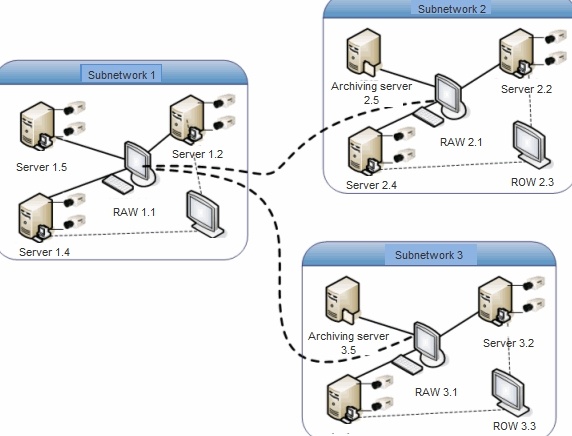
For example, to set up database synchronization for the servers of the distributed system shown in the figure, you needmust:
- to sync Synchronize the databases of 1.2, 1.4, 1.5 servers server databases with the 1.1 Remote Admin Workstation database;remote administrator workstation database.
- Synchronize the to sync the databases of 2.2, 2.4 servers server databases and the 2.5 archiving server with the 2.1 Remote Admin Workstation database;remote administrator workstation database.
- Synchronize the to sync databases of 3.2, 3.4 servers server databases and the 3.5 archiving server with the 3.1 Remote Admin Workstation database;remote administrator workstation database.
- Synchronize the to sync databases of 3.1 and 2.1 and Remote Admin Workstations with 1.1 Remote Admin Workstation database.
...
- remote administrator workstation databases with the 1.1 remote administrator workstation database.
Overview
Content Tools