Versions Compared

Key

  • This line was added.
  • This line was removed.
  • Formatting was changed.
Tip

Camera requirements for the Fire detection and Smoke detection modules

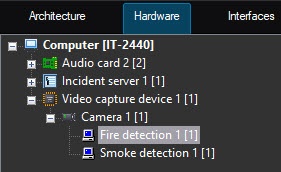
  • You can configure the Fire detection module on the settings panel of
  • the 
  • the Fire detection object created on the basis of the Camera object on the Hardware tab of the System settings window.
  • You can configure the Smoke detection module on the settings panel of the Smoke detection object created on the basis of the Camera object on the Hardware tab of the System settings window.
    Image Modified

The To configure the Fire detection and Smoke detection modules are configured similarly and as follows modules, do the following:
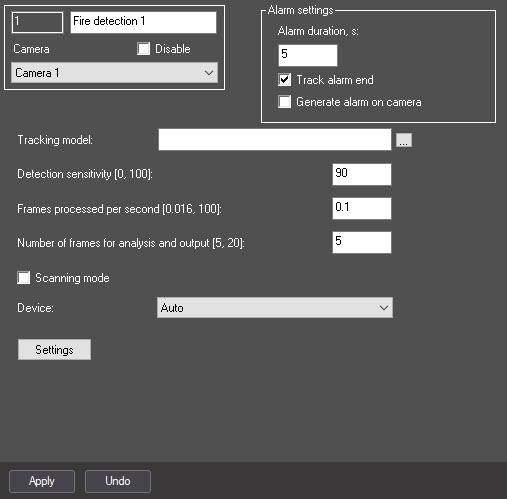
  1. Go to the settings panel of the
  2. appropriate
  3. corresponding module.
    Image Modified
  4. To receive events about the end of fire/smoke only after the time period
  5. specified in
  6. from the Alarm duration, sec
  7. parameter
  8. setting, set the Track alarm end checkbox. By default, the checkbox is
  9. clear
  10. cleared, which means that events about the end of fire/smoke are received immediately.
  11. In the Alarm duration, sec field, enter the time period in seconds during which the repeated fire/smoke alarm events are ignored. By default, the setting isn't available for editing. To enable it, you must set the Track alarm end checkbox (see the previous step).
    Info
    titleNote
  12. The
  13. If you set the Track alarm end checkbox, the events about the end of fire/smoke are received after the time specified in

  14. the
  15. the Alarm duration, sec

  16. parameter has expired. During this time, all repeated fire/smoke alarm events are ignored. A
  17. setting. If, until the end of this period, the current fire/smoke is completed and the new one is detected, the detector doesn't generate events about completing the current and starting the new alarm. The new fire/smoke event is received

  18. immediately
  19. after the current alarm

  20. has
  21. is completed.

  22. Set the Generate alarm on camera checkbox if
  23. it is necessary
  24. you want to initiate an alarm on the camera when
  25. a detector is triggered
  26. the detector generates an event.
  27. By default, the standard (default) neural network is initialized according to the device selected in
  28. the Device drop-down list. The
  29. step 10. You must not select the standard neural networks for the different
  30. types of processors are selected
  31. processor types manually, since it is performed automatically. If there is a
  32. custom
  33. unique neural network
  34. is prepared
  35. for use,
  36. in the
  37. click the Image Added button to the right of the Tracking model field,
  38. click the Image Removed button,
  39. and 
  40. select the
  41. specify its file in the standard Windows Explorer window that opens.
  42. In the Detection sensitivity [0, 100] field, enter the detector sensitivity

  43. of the detector
  44. —an integer value in the range from 0 to 100. This parameter determines at what certainty of fire/smoke detection the detector

  45. will trigger
  46. generates an alarm: the higher the sensitivity, the higher the recognition threshold. For example, at sensitivity 100, the detector neural network must get 100% certainty for some period of time

  47. when
  48. during the frame processing

  49. the frames
  50. . The value of the Detection sensitivity field is determined experimentally.

  51. In the Frames processed per second [0.016, 100] field, set the number of frames per second that
  52. will be processed by
  53. the neural network processes. This value affects the processor load: the higher the value, the greater the load. It also affects the operation speed of the algorithm: the higher the frame rate, the faster the required number of frames are collected for making a decision and
  54. triggering
  55. generating an alarm, if required.
  56. In the Number of frames for analysis and output [5, 20] field, enter the minimum number of frames in the range from 5

  57. 20
  58. to 20 for the detector to analyze before

  59. triggering
  60. generating an alarm. The higher the value, the more reliable the result of the detector operation. At the same time, if the value is too high, the short-time fire/smoke can be missed. If you enter a value less than the minimum, the value is set to

  61. 5. Info
    titleNote
    Multiplication of Alarm duration, sec and Number of frames for analysis and output [
  62. 5

  63. , 20] values is the time period (in seconds) after which the alarm is generated after the fire/smoke detection
  64. .

  65. Set

  66. the
  67. the Scanning mode checkbox to track small objects. If you enable this mode, the load on the system increases.

  68. So
  69. That is why we recommend

  70. specifying a
  71. setting the small number of frames processed per second in

  72. the Frames processed per second [0.016, 100] field
  73. step 7. By default, the checkbox is

  74. clear
  75. cleared. For more information on the scanning mode, see Configuring the Scanning mode.

    Info
    titleNote

    You cannot configure the scanning windows for the Fire detection and Smoke detection modules. The default parameters are used.

    When you use the scanning mode, we recommend using a full frame without specifying the area of interest in step 11.

  76. From the Device drop-down list, select the device on which the neural network will operate: the CPU, one of the NVIDIA GPUs, or one of the Intel GPUs. Auto (default value)—the device is selected automatically:
  77.  
  78. The NVIDIA GPU gets the highest priority, followed by the Intel GPU, then the CPU.
    Note
    titleAttention!

    We recommend using the GPU.

    It can take several minutes to launch the algorithm on the NVIDIA GPU after you apply the settings. You can use caching to speed up future launches (see Optimizing the operation of neural analytics on GPU).

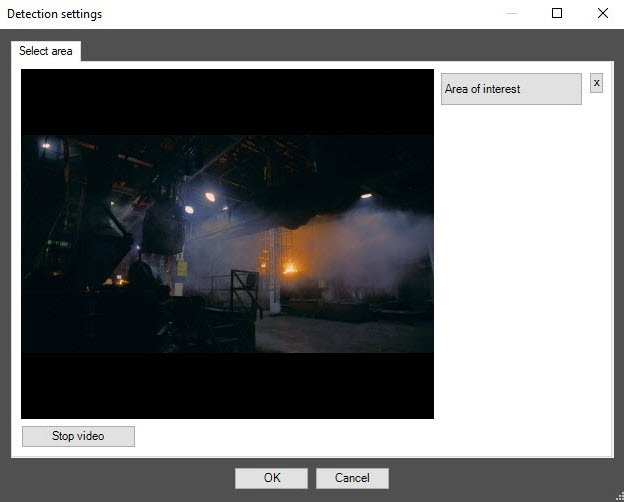
  79. Specify the area of interest on the video image:
    1. Click the Stop video button to capture the frame of the video image.
      Image Modified
    2. Click the Area of interest button.
    3. On the captured video

  80. image
    1. frame, sequentially set the anchor points of the area using the left mouse button, the situation

  81. in
    1. of which you want to analyze

  82. , by sequentially clicking the left mouse button
    1. . After you add

  83. an
    1. the area, the

  84. rest
    1. remaining part of the video image is darkened. If you don't specify the area of interest, the entire frame is analyzed.
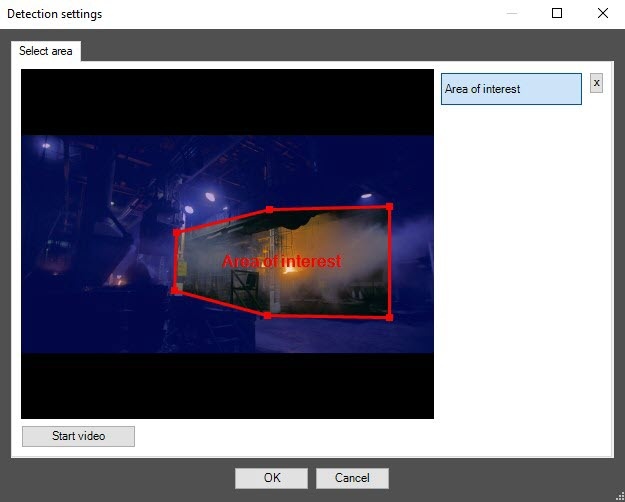
      Image Modified

    2. Click the OK button.

      Info
      titleNote

      To remove the area, click the Image Modified button next to the Area of interest button.

      You can add only one area. If you try to add

  85. a
    1. the second area, the first area

  86. will be
    1. is deleted.

  87. Click the Apply button.

Configuring the Fire detection and Smoke detection modules is complete. 

...