
Go to documentation repository


Page History
...
- Add a Temperature Matrix Data object in the Embedded Detection group.
- Under the newly added object, create a Face Detection and Temperature Control.
- Select temperature unit (1).

- To caption video with thermal data, do the following:
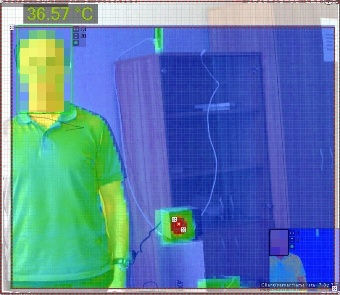
- Select Yes for the Show Thermal Overlaythermal overlay parameter (2).
- In the Preview window, drag anchor points
 points
  to draw an area where thermal data should be displayed.

- If you use an Electromagnetic Radiation Absorber radiation absorber (BB), do the following:
- Specify its temperature (3). If temperature readings in this point are different, the bias will be used to re-calculate readings across all measurement points.

- In the Preview window, double click to add anchor points at at the position of the electromagnetic radiation absorber (BB).

- Specify its temperature (3). If temperature readings in this point are different, the bias will be used to re-calculate readings across all measurement points.
If you have discovered that your readings differ from actual temperature values, add the offset value into the Temperature Value Offsetvalue offset field (4). Bias values may be positive or negative.
Info title Note The rest of this detection tool parameters are identical to those of the basic face detection tool (see Configure Facial Recognition Configuring Face detection).
- Click the Apply button.
...
Overview
Content Tools