
Go to documentation repository


Page History
The Short messageMessage object is designed used to create a short messages message (SMS) for transmission to mobiles phones via a mobile networkthat can be sent to a mobile phone via cellular communication.
The settings panel of the Short messageMessage object is shown in the figure.
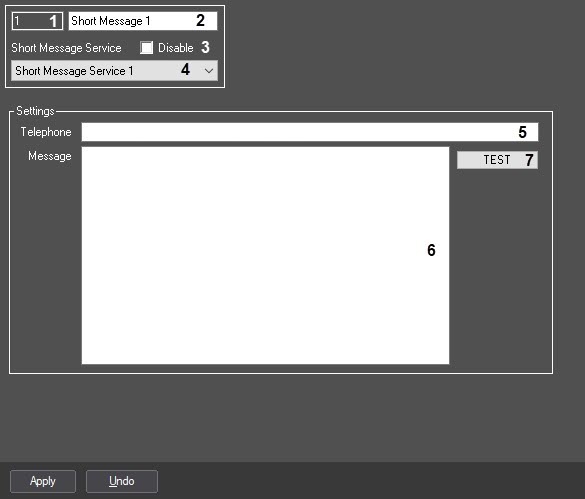
Table The table describes the setting parameters of the settings corresponding to the elements of the settings panel of the Short message Message object.
№
| Parameter | Method for setting the parameter value | Parameter description | Symbols usedRepresentation | Default value | Value range | |||
1 | The Identification number* | Automatically | Displays the identification number of the Short messageMessage object in the digital distributed video surveillance system . | Sequence of numbers | - | with distributed architecture | Digits, letters, periods, hyphen, dash, and underscore | NAFrom 1 and above. | Depends on the number of the Short message Message objects in the digital distributed video surveillance system .with distributed architecture |
2 | The Name* | Enter the value in the field | Defines Sets the name of the Short messageMessage object in the digital distributed video surveillance system .with distributed architecture | Latin alphabet, Cyrillic, digits and service characters | Short messageMessage | A line containing a sequence of any symbols characters (letters, digits, service characters apart from except > and < symbolscharacters), not case-sensitiveinsensitive Number of symbols – characters—from 1 to 60. | |||
3 | The Disable | Is identified by the check mark | checkbox | Set the checkbox | Disables the Short Message object in the video surveillance system with distributed architectureDefines the condition of the Short message object (enabled or disabled) in the digital distributed video surveillance system. | Boolean type | Not available | Clear | Set—the Short Message Yes – the Short message object is disabled and is not in useNo – the Short message object is enabled and is in use.isn't used Clear—the Short Message object is enabled and used |
4 | Short message service | The Short Message Service drop-down list | Select the value Is selected from the list | Defines Sets the Short Message Service parent Short message service object of the digital distributed video surveillance system, system with distributed architecture to which the given given Short messageMessage object refers.belongs | Name Names of the Short message serviceMessage Service objects registered in the system | Name of the parent Short Message Service parent object | Depends on the number of the Short message serviceMessage Service objects in the digital distributed video surveillance system with distributed architecture | ||
The Settings Groupgroup | |||||||||
5Phone | The Telephone field | Enter the value in the field | Defines a Sets the mobile phone number for receiving SMS.of the short message (SMS) recipient | Sequence of numbers | Not definedNA | Number according to the international dial plan:in the international format. Multiple numbers are listed, separated by a semicolon. Example: +79061234567;+79271112233 | |||
6 | The Message field | Enter the value in the field | Defines SMS textSets a text of the short message (SMS), which will be transmitted over the mobile network.sent via cellular communication | Latin alphabet, Cyrillic, digits and service charactersNot defined | NA | A line containing a sequence of any symbols characters (letters, digits, service characters), not case-sensitiveinsensitive. Number of symbols – from characters—from 1 to 60. | |||
| 7 | The TEST button | Click the button | Forced sending of a the short message to the specified number. | -NA- | NA | -NA | |||
*The name Name of the element is not isn't displayed in the settings panel of the given object.
Overview
Content Tools