
Go to documentation repository


Page History
The Failover service object is used to ensure the operation of the distributed system in the failover mode.
The settings panel of the Failover service object is shown in the figure.
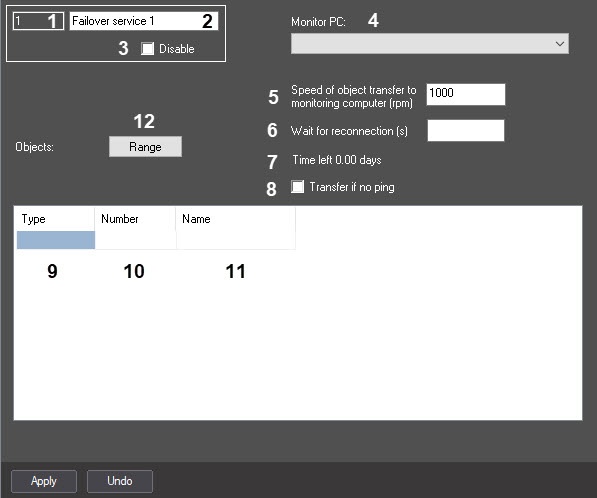
Description of The table describes the setting parameters relevant corresponding to the elements on of the settings panel of theFailover service object is given in table.
№
| Parameter
| Method for setting the parameter value | Parameter description |
Representation | Default value | Value range | ||||
1 | The Identification number* | Automatically | Displays the identification number of the Failover servicesystem object | Digits, letters, periods, hyphen, dash, and underscore | NA | Depends on the number of the Failover service object in the video surveillance system with distributed architecture |
2 | The Name* | Enter the value in the field | Sets the name of the Failover service object in the video surveillance system with distributed architecture | Latin alphabet, Cyrillic, digits, and service characters | Failover service | A line containing a sequence of any characters (letters, digits, service characters except > and < characters), case-insensitive. Number of characters—from 1 to 60 |
3 | The Disable | Set the checkbox | Disables the Failover service object in the video surveillance system with distributed architecture | Boolean type | Clear | Set—the Failover service object is disabled and isn't used Clear—the Failover service object is enabled and used |
4 | The Monitor PC |
drop-down list | Select the value from the list | Sets the name of the |
server, the state of which is |
monitored by the object | Names of the Computer objects registered in the system |
NA | Depends on the number of the Computer objects registered in the system |
2
5 | The Speed of object transfer to monitoring computer (rpm) field | Enter the value in the field | Sets the speed of transferring objects if the connection is lost. This setting is necessary so that the failover server sends messages at a certain speed and the receiving server has time to process them. The transfer speed must be set depending on the network speed, server bandwidth, and so on | Sequence of numbers | 1000 | From 0 and above |
6 | The Wait for reconnection ( |
s) field |
Enter the value in the field | Sets the time period |
in seconds |
after which the configuration will be transferred to |
the backup server after the loss of connection with the monitored server | Sequence of numbers |
NA | From 0 to 65535 |
| 7 | The Time left |
| 0.00 seconds string | Automatically |
Displays the period of time |
in days |
remaining |
to restore the configuration from the backup |
server to the main server and restore the license | Days | 0.00 | From 0.00 to 50.00 |
| 8 | The Transfer if no ping checkbox | Set the checkbox |
| When you log out and reload the backup server, the system sets the necessity to transfer the configuration |
| if there is no ping from the main monitored |
| server during the time specified in the Wait for reconnection (s) field (the FORCED_START reaction of the forced transfer, see FAILOVER Failover service) | Boolean type |
| Clear | Set—when you log out and reload the backup server, the forced configuration transfer occurs |
if there is no ping |
No - it is not taken into account whether the ping is present or absent when transferring the configuration.
from the main server during the time specified in the Wait for reconnection (s) field Clear—when you log out and reload the backup server, a response from the main server isn't monitored and the configuration isn't transferred even if the main server is unavailable | ||
9 | The Type | Select the value from |
5
Type
the list | Sets the object type in |
the configuration |
of the monitored server that must be transferred to the backup |
server in case of connection |
loss | Types of objects registered on the |
basis of the main |
server |
NA | Depends on the configuration created on the |
basis of the main |
server |
10 | The Number | Select |
the value from the list | Sets the |
identifier of the object of the selected type that |
must be transferred to the backup |
server in case of connection |
loss |
Identifiers of the objects of the selected type that are present in |
the configuration of the monitored server |
NA | Depends on the number of the objects of the selected type in the configuration of main |
server |
11 | The Name field | Automatically | Sets the name of the object |
that |
must be transferred to the backup |
server in case of connection |
loss | Names of the objects of the selected type that are present in |
the configuration of the monitored server |
NA | Depends on the configuration created on the |
basis of the main |
server |
12 | The Range | Click the button | Opens the dialog |
window for |
the complex selection of |
the monitored objects | NA |
NA |
-
NA |
*Name of the element isn't displayed in the settings panel of the given object
Overview
Content Tools