
Go to documentation repository


Page History
The Region object is
...
used to create the zones, which break down
...
the protected areas into structural elements.
The
...
Region objects allow:
...
- Grouping the hardware based on the attributes of a certain region;
...
- Executing certain operations
...
- simultaneously with all objects of the same type belonging to the same region.
The settings panel of the Region object is shown in the figure.
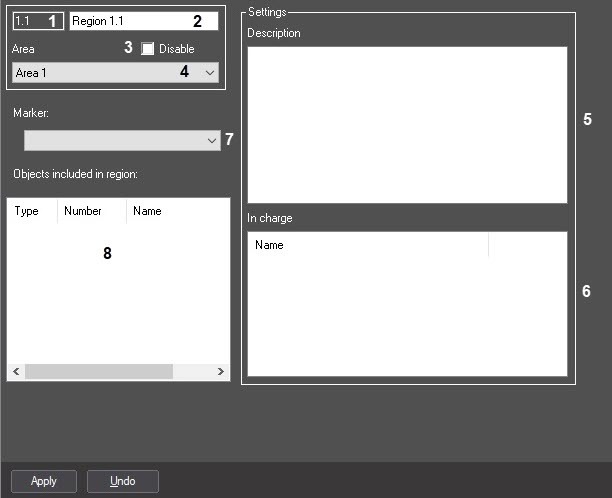
The table describes the setting parameters
...
corresponding to the elements of the settings panel of the Region object.
№ | Parameter | Method for |
setting the parameter value | Parameter description |
Representation | Default value | Value range |
1 | The Identification number* | Automatically |
Displays the identification number of the Region object in the |
video surveillance system |
Sequence of numbers |
NA | From 1 to 65534. Depends on the number of the Region objects in the |
video surveillance system | ||
2 | The Name* field | Enter the value in the field |
Sets the name |
of the Region object |
Latin alphabet, Cyrillic, digits, and service characters | Region | A line containing a sequence of any |
characters (letters, digits, service characters |
except > and < |
characters), case-insensitive. Number of |
characters—from 1 to 60 |
3 | The Disable |
checkbox |
Is identified by the check mark
Set the checkbox | Disables the Region |
object in the |
video surveillance system |
with the distributed architecture | Boolean type |
Not available
Clear | Set—the Region |
object is disabled and |
No – the Region object is enabled and is in use.
4
Area
isn't used Clear—the Region object is enabled and used | ||
4 | The Area | Select the value |
from the list |
Sets the Area parent |
object |
to which the given Region object |
belongs |
Names of the Area objects registered in the system |
Name of the |
Area |
parent object | Depends on the number of the Area objects in the |
system |
| The Settings | ||||||
| group | ||||||
5 | ||||||
The Description | Enter the value in the field |
Sets the description of the given region |
Latin alphabet, Cyrillic, digits, and service characters |
| NA | A line containing a sequence of any |
characters (letters, digits, service characters), case-insensitive. Number of |
characters—from 1 to 60 |
6 |
Description
| The In charge field | |||||
The Name | Select the value | ||||
from the list |
Sets the users registered |
in the system |
as responsible for the given region |
Latin alphabet, Cyrillic, digits, and service characters |
| NA | Depends on the number of the users registered |
in the system |
7 |
The Marker | Select the value from the list | Specifies the set of |
the icons which is used to display the region on the interactive map | Available set of |
the icons specified by |
the ddi.exe utility |
| NA | Depends on the number of the available sets of |
the icons | |
8 | The Objects included |
in region table | Automatically | Displays the list of the objects related to this region |
Types, numbers, |
and |
names of the objects included |
in region |
| NA | Depends on the number of the objects related to this region |
*The name Name of the element is not isn't displayed in the settings panel of the given object
Overview
Content Tools