
Go to documentation repository


Page History
Create To create and configure the Camera object as follows, do the following:
- Select Create object -> Camera in the context In the menu of the Video Capture Device objectthe Video capture device object, select Create object → Camera.
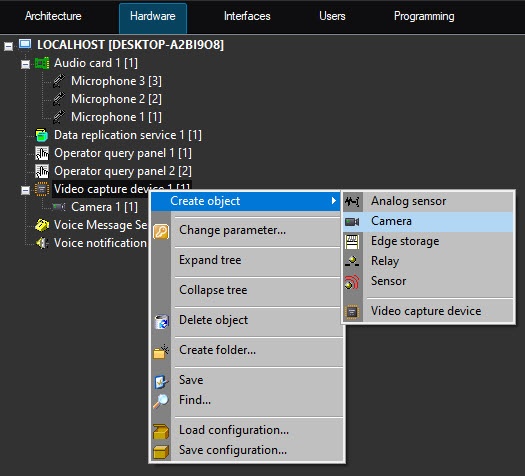
As a result, the basic settings toolbar panel of the object is displayed.

Info title Note Basic settings are specified set automatically. It is possible to change an If necessary, you can change the ID, object name, and parent object.
- Click Apply to create an object.
- In To create the object tree, click the Apply button.Select the select the created Camera object in the object tree (1).

- Configure To configure the created object.
, do the following:From the In the Channel number list (2) , select a the physical video output of the card input to which the camera is connected (see Features of video subsystem configuration section).
Info title Note Channel numbers within one Video capture card device object must not be repeated.
In the Resolution list (3) , select the resolution with which the video signal is captured: Standard – —minimum accepted allowable value for the card, High – mean value —average value, and Full – —maximum accepted value with which a video signal is capturedallowable value.
Info title Note title NoteResolutions supported by video capture cards are given in Appendix 4. Technical specifications of video capture cards
Info title .
While configuringWhen you configure the
videocamera, which is connected
throughvia the SC590N4 video capture card, in
theAxxon PSIM
software, you must set the frame resolution
isequal to
be set asthe resolution set on the
videocamera. Otherwise,
artefactsartifacts can appear on the video image.
Info Note If you use the Stretch VRC-6404 HD video capture card is in use, then restart Axxon PSIM after changing resolution. , you must restart Axxon PSIM when you change the resolution.
Changing the Resolution doesn't guarantee that the resolution of the received video signal changes, as it depends, among other things, on the internal settings of the camera itself. If you need to specify certain streams strictly, it is better to configure multistreaming video.
- Click the Apply button to save the changessettings.
Configuring the Camera object is completedcomplete.
Repeat these actions the steps described in this section for all cameras connected to the card.
| Info | ||
|---|---|---|
| ||
Number The number of the Camera objects that can be created under Video capture card object you can create on the basis of one Video capture device object is specified in Features of video subsystem configuration section. | ||
| ||
Detailed description of all settings of the Camera object is given in in Administrator's guideGuide. |
Overview
Content Tools