
Go to documentation repository


Page History
Axxon PSIM can act as receiver and transmitter of RabbitMQ events. Download and install the following components from the https://www.rabbitmq.com/install-windows.html website before using this functionality:
- Rabbit service.
- Erlang.
By default, RabbitMQ has a built-in guest/guest account that only works with localhost. Create a new account to use RabbitMQ remotely.
...
- Go to the RabbitMQ tab on the Security zone object settings panel on the Programming tab of the System settings dialog box (1).
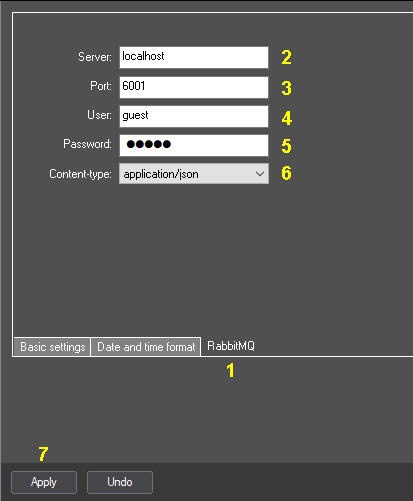
- In the Host field, enter the name or address of the RabbitMQ host (2).
- In the Port field, enter the port to connect with the RabbitMQ host (3). If the port is 0 or not set (by default), the RabbitMQ client does not run.
- In the User field, enter the RabbitMQ user name (4).
- In the Password field, enter the RabbitMQ user password (5).
- From the Content-type drop-down list, select the data type to be sent and received by Axxon PSIM (6):
application/json – a message is sent and received in JSON format. If Axxon PSIM cannot parse the message in JSON format, an attempt is made to recognize the message in plain/text format.
plain/text – the Axxon PSIM event is sent and received in the format "TYPE|ID|EVENT".
- Click Apply (7).
Axxon PSIM provider and third party receiver
...
amq.topic allows for subscriptions ranging. Each event sent from Axxon PSIM is signed with a special header, which is built according to the following scheme:
routingkey = "Axxon PSIMpsim.event." + msg.GetSourceType() +"." + msg.GetSourceId() + "." + msg.GetAction();
...
amqp_listen.exe localhost 5672 amq.topic Axxon PSIMpsim.event.#
Subscription to Action==”RUN” events
amqp_listen.exe localhost 5672 amq.topic Axxon PSIMpsim.event.*.*.RUN
| Note | ||
|---|---|---|
| ||
Events enter the RabbitMQ queue from each Axxon PSIM core individually. For example, if there are two cores in the system, and the event occurred on a core that has incorrect settings or does not have a connection to RabbitMQ, the event will not get into the queue, despite the fact that the second core will receive it. Each core sends only its own messages. |
...
The receiver is implemented according to the amq.direct scheme. It is subscribed to all events with the "bindingkey" key. bindingkey should have the following format: "Axxon PSIMpsim." + ComputerName (case sensitive).
...
amqp_sendstring.exe localhost 5672 amq.direct Axxon PSIMpsim.ASUS "CAM|1|HELLO"
or JSON
amqp_sendstring.exe localhost 5672 amq.direct Axxon PSIMpsim.ASUS {\"Type\":\"MACRO\",\"Id\":\"1\",\"Action\":\"RUN\",\"Params\":{\"test1\":\"+++\",\"test2\":\"000\"}}
Overview
Content Tools