
Go to documentation repository


Page History
| Section | |||||||||||||||||||||
|---|---|---|---|---|---|---|---|---|---|---|---|---|---|---|---|---|---|---|---|---|---|
|
...
Click File and then double click the required file in the Windows standard Open box (1).

- The full name of the selected file is displayed in the Video source field (2).
...
- Click Server (1). The Cameras dialog box opens.

- In the IP field, specify the IP address of the Axxon PSIM video server (2).
- Click Get (3). If connection with the server is established, the Cameras field displays the list of cameras.
- Set the check boxes next to the cameras to check performance using their archive (4) or set the Select all check box to select all the cameras in the list (5).
- Click OK (6).
- The selected cameras are added into the Video source field (7).
...
- Activate Compression check checkbox to check how many fps the given computer can compress (1).
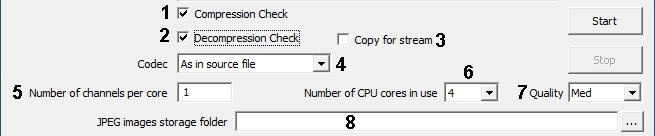
- Activate Decompression check checkbox to check how many fps the given computer can decompress(2).
- Select the Copy for stream check box to create a separate copy of each stream file in the RAM in order to avoid conflicts during the check (3). This function increases memory consumption when running the fps.exe utility.
- Select the required compressor version from the drop-down list Codec (4).
Enter the required number of emulated cameras in the field Channels amount (5).
Info title Note. This setting is actual only with emulation of pattern set of channels. In the Number of CPU cores in use field specify the number of CPU cores to be used for performance check (6).
- Select the required value of frames compression from the dropdown list Quality (inversely to compression level) (7).
- When necessary, set the directory where frames extracted from the video would be unzipped by clicking clicking
 next to the Jpeg images storage folder field (8).
...
Click the Start button to run video processing tester (1).

As a result,parameters of video processing productivity will bedisplayed in the title bar of the utility window (2).
...
Overview
Content Tools