
Go to documentation repository
Before starting the search, select the databases to search in by checking the appropriate checkboxes captioners, the databases of which will be searched by setting the checkboxes next to the required captioners (1) in the captioners status table below.

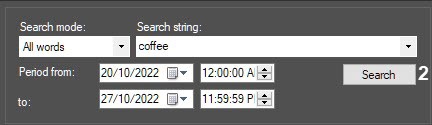
Click the Search button (2) to start searching.
In the The Status column (3) is displayed displays the search status (the Executing query…query status (4) for all selected databasescaptioners).

To stop searching at any time, click the Cancel button.
| Info | ||
|---|---|---|
| ||
Search cancellation may not work (depends on the type of database management system used in POS PSIM). |
The search process stops when all selected captioners are processed, i.e. the Status column reads column has the Query completed status for all selected captioners (5). The number of found records for each captioner will be displayed in the Total column (6) of the captioner status table, while the . The list of all found transactions will be displayed in the search results table (7).
...

