
Go to documentation repository


Page History
...
- Go to Settings → Options (1)→ Alarm processing (2).
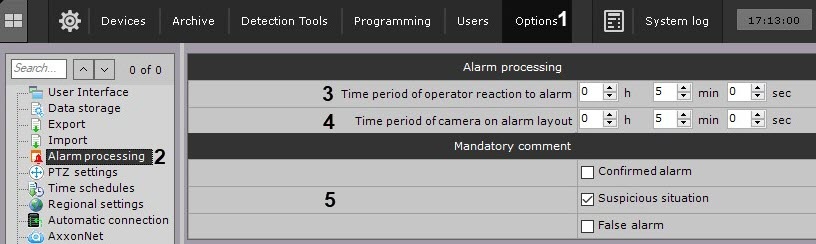
In the Time period of operator reaction to alarm field (3), enter the time during which the alarm should must be taken into processing, otherwise it will be is assigned the Skipped status(3). The minimum value is 2 minutes.
Info title Note To take an alarm into processing, it is necessary to you must switch to the alarm Alarm management mode.
Info title NoteAfter an alarm is taken into processing, the time for handling it is not limitedunlimited.
- Set the maximum time for an alarm to stay on a special layout (4, see Working with Special layouts). After the specified time has elapsed, the alarm will be is removed from the layout and its place will be is taken by the next onealarm, which has not yet been displayed on the layout.
Select the alarm assessment, after accepting which, the operator is required to enter a comment (5).
- Click the Apply button.
...
Overview
Content Tools