
Go to documentation repository


Page History
| Note | ||
|---|---|---|
| ||
Before installation, we strongly recommend that you read the restrictions on names of servers and computers in Axxon One (see Limitations of Axxon One in Linux OS). |
Installation from the repository is performed automatically, including all the system components.
To install from the repository, do the following:
Sequentially run the commands:
Code Block language bash echo 'deb http://download.axxonsoft.com/debian-repositorystretchbuster main backports/main' | sudo tee -a /etc/apt/sources.list.d/axxonsoft.list
echo 'deb http://download.axxonsoft.com/debian-repositoryweekly mainstretch backports/main' | sudo tee -a /etc/apt/sources.list.d/axxonsoft.list
wget --quiet -O - "http://download.axxonsoft.com/debian-repository/info@axxonsoft.com.gpg.key" | apt-key --keyring /etc/apt/trusted.gpg.d/axxonsoft.gpg add -
apt-get updateecho 'deb http://download.axxonsoft.com/debian-repositorystretch main backports/astra backports/stable main' | sudo tee -a /etc/apt/sources.list.d/axxonsoft.list
wget --quiet -O - "http://download.axxonsoft.com/debian-repository/info@axxonsoft.com.gpg.key" | sudo gpg
apt--
keydearmor -
-keyringo /etc/apt/trusted.gpg.d/axxonsoft.gpg
add -
&& sudo apt-get update
Info title Note If the distribution packages based on Debian 10 are used, it may be necessary to install additional packages:
sudo apt-get install wget
sudo apt-get install gnupg
To install Axxon One
Serverserver, run the following command:
Code Block language bash sudo apt install axxon-oneTo install the FailOver
Serverserver, run the following command:
Code Block language bash sudo apt install axxon-one-raftNote title Attention! It is not allowed to simultaneously install the regular
Server server and the FailOver
Serverserver.
During the installation, the installer will request the name of the
Axxon-domain for the Axxon One server. If you leave this field blank, you can specify it on the
Client client at the first connection.
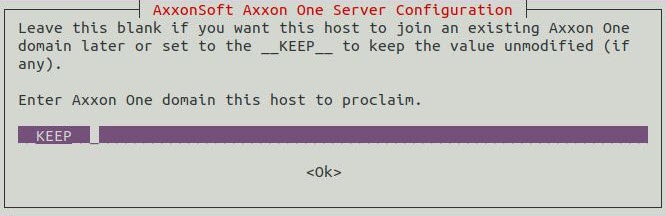
- If necessary, you can install the add-ons to the basic DetectorPack (see Installing add-ons to the basic DetectorPack in Linux OS).
| title | Attention! |
|---|
If you install Axxon One on AstraLinux SE, then instead of commands from step 1, you should sequentially run the following commands:
| language | bash |
|---|
Installation is complete.
Overview
Content Tools