
Go to documentation repository


Page History
VMDA metadata storage stores contains object trajectories covered by a camera. Information in the cameras' FOV. The information that is stored in the VMDA metadata storage is used for the forensic search in an the archive.
To configure the VMDA metadata storage, do the following:
- Go to the Hardware tab in the System settings dialog box window (1).
- Create the VMDA metadata storage object on the base (2) on the basis of the Computer object in the objects tree.
The object appears in the objects tree, and the settings panel for the created object appears of this object is displayed in the right part of the Hardware tab (2) System settings window.
In From the Disk drop-down list (3), select the disk for saving the archive (3)storing an archive.
Info title Note The archive will be is saved on the selected disk in the VMDAfolder. Note title Attention! Storing the data to the When you record object trajectories in the VMDA metadata storage may be very computer-intensive. The following actions are to be performed for proper system operation, there can be the considerable consumption of computer resources. For the system to operate in a stable way, we highly recommend doing the following:
1.Create Create the VMDA metadata storage object on a the separate Serverserver.
2. Enable disk caching by means of redundant array of independent disks using RAID or OS means.- In the Archive depth field (4), set the time period (in days) of storing the archive (4).
- Select the cameras the metadata from of which is recorded to be saved in a the created storage.
For To do this, follow these stepsdo the following:Create a the Search channel object under on the basis of the VMDA metadata storage object (1). The number of available search channels is determined by the number of cameras in the license key.
Info title Note If you get the license key earlier than December 2020, then configure the VMDA metadata storage object as described in the documentation for Axxon PSIM 1.0, that is, don't create the Search channel objects. After you update the license key, you must create and configure the Search channel objects as described below.
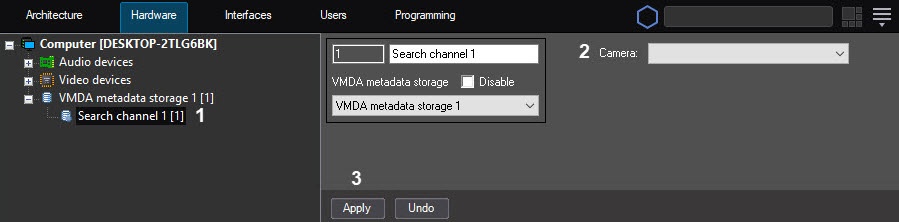
- From the Camera drop-down list (2), select the the Camera object (2).
- To save the changes, click Click the Apply button (3).
The Creating and configuring the VMDA metadata storage is now created and configuredcomplete.
Overview
Content Tools