
Go to documentation repository


Page History
The You can create the HTML interface object is created object on the basis of the Display object on the Interfaces tab of the System settings dialog window.
 Object's settings panel will display on
After you create the object, its settings panel is displayed in the right part of the System settings
...
window
...
.
To set the position of the HTML Interface object on the screen, do the following:
- Go to the settings panel of the HTML Interface object.
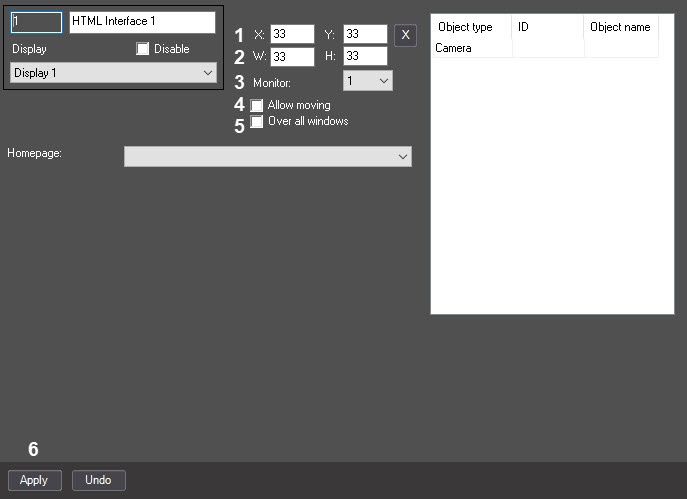
- In the X: and Y: fields fields, specify the coordinates of the interface window's upper left corner of the HTML interface window (1). Coordinates are counting counted from the display's upper left corner of the display and expressing expressed as a percentage of the screen width and height, respectively.
- In the W: and H: fields fields, specify the width and height of the HTML interface window as a percentage of the screen width and height, respectively (2).
- From the Monitor drop drop-down list, select the number of the monitor on which the the HTML Interface object is to object must be displayed via a mouse click (3).
- Set the
- the Allow moving checkbox
- checkbox (4) if you want to allow the operator changing
- to change the position of the
- the HTML Interface window via a mouse click (4).If it is necessary for the HTML Interface window to be displayed
- window by using the mouse.
- Set the Over all windows checkbox (5) if you want to display the HTML Interface window on top of all windows , set the Over all windows checkbox (5)
- .
- Click Click the Apply button (6).
Setting the position of the the HTML Interface object interface object on the screen is completedcomplete.
Overview
Content Tools