
Go to documentation repository


Page History
...
- In the System settings dialog window, go to the Hardware tab.
- Create an IIDK Interface object based on the Computer object. Set the identifier of the IIDK Interface object (1).

Create an Agent Of Control object based on the Computer object. On the settings panel of this object, in the IIDK interface field (2), enter the identifier of the previously created IIDK Interface object.
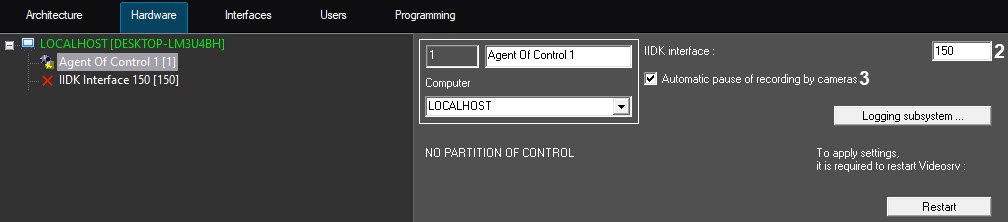
- The Automatic pause of recording by cameras checkbox (3) is set by default, so that the scripts from the code are executed automatically. The SleepAfterDisarm and SleepAfterRecStop parameter parameters of the HKEY_LOCAL_MACHINE\SOFTWARE\Wow6432Node\BitSoft\VHOST\VHostService registry key are used for fine-tuning these scripts (for details, see the registry keys reference guide Vertical solutions). When the checkbox is clear, you can use the scripts described here to pause recording by cameras.
Create one or more Partition Of Control child objects based on the Agent Of Control object.

Info title Note The Partition Of Control object name cannot contain the following characters: underscore "_", backslash "\", angle brackets ">" and "<", single quote "'".
It is also necessary to create Video capture device, Camera, and Sensor objects in the hardware tree that correspond to the connected hardware. Creation and configuration of these objects is described in Axxon PSIM Software Package. : Installing and configuring security system components guide.
...
Overview
Content Tools