
Go to documentation repository


Page History
...
- Go to the DB or DB protocol tab on the settings panel of the Operator protocol object (1).

- Click the Connecting dialog button (2).
The SQL Server Login dialog box will be window is displayed.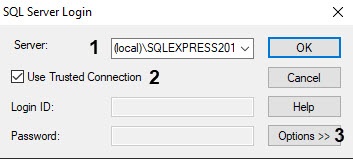

In the Server list, specify the SQL Server server to which you want to connect to (1).
Info title Note. To ensure stable and proper operation of Axxon PSIM on the Windows 11 OS, we recommend using the Microsoft SQL Server 2019 Express database server or the newer version
If the required SQL Server is in the Server list, then there is no need to further configure the connection.
Info title Note. Working When you work in the distributed configuration it is needed to enter , you must specify the name of the computer without using the (local) value where the database is stored. For example, "WS1\SQLEXPRESS", where WS1 – is the name of the computer on which the database is stored.
If you need want to specify the login and password to authorize the SQL Serverserver, then set the Use Trusted Connection checkbox unchecked (2). As a result, the the Login ID and Password fields are available for editing.
Info title Note. If If you set the Use Trusted Connection checkbox is set, then the authorization on the SQL Server will be provided server is performed using Windows account informationcredentials. - To set advanced connection options, click the Options >> button (3).
- In the Database drop-down list (4), select the database to store events (4).
- In From the Language list (5), select the language of SQL system messages (5).
- In the Application Name field (6), set the application name (Axxon PSIM by default) (6).
- In the WorkStation ID field (7), set the computer name (WindowsID Windows ID by default) (7).
- To save the settings, click the OK button.
| Info | ||
|---|---|---|
| ||
| To To view the supplemental help information about the the SQL Server Login dialog boxwindow, click the the Help button. |
The Configuring the database server connection is now configuredcomplete.
Overview
Content Tools