
Go to documentation repository


Page History
| Note | ||
|---|---|---|
| ||
Before installation, we strongly recommend that you read the restrictions on names of servers and computers in Axxon One (see Limitations of Axxon One in Linux OS). |
Installation from the repository is performed automatically, including all the system components.
To install from the repository, do the following:
Sequentially run the commands:
Code Block language bash echo 'deb http://download.axxonsoft.com/debian-repositorystretchbuster main backports/main' | sudo tee -a /etc/apt/sources.list.d/axxonsoft.list
echo 'deb http://download.axxonsoft.com/debian-repositoryweekly mainstretch backports/main' | sudo tee -a /etc/apt/sources.list.d/axxonsoft.list
wget --quiet -O - "http://download.axxonsoft.com/debian-repository/info@axxonsoft.com.gpg.key" | apt-key --keyring /etc/apt/trusted.gpg.d/axxonsoft.gpg add -echo 'deb http://download.axxonsoft.com/debian-repositorystretch main backports/astra backports/stable main' | sudo tee -a /etc/apt/sources.list.d/axxonsoft.list
wget --quiet -O - "http://download.axxonsoft.com/debian-repository/info@axxonsoft.com.gpg.key" | sudo gpg
apt--
keydearmor -
-keyringo /etc/apt/trusted.gpg.d/axxonsoft.gpg &&
addsudo
-
apt-get update
Info title Note If the distribution packages based on Debian 10 are used, it may be necessary to install additional packages:
sudo apt-get install wget
sudo apt-get install gnupg
To install Axxon One
Serverserver, run the following command:
Code Block language bash sudo apt install axxon-oneTo install the FailOver
Serverserver, run the following command:
Code Block language bash sudo apt install axxon-one-raftNote title Attention! It is not allowed to simultaneously install the regular
Server server and the FailOver
Serverserver.
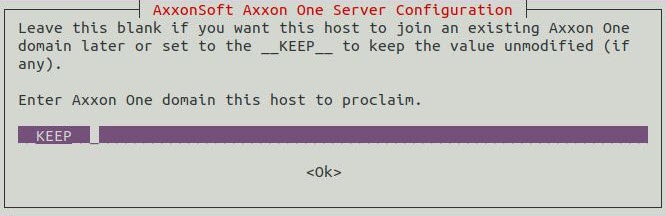
During the installation, the installer will request the name of the domain for the Axxon One
Serverserver. If you leave this field blank, you can specify it on the
Client client at the first connection.
- If necessary, you can install the add-ons to the basic DetectorPack (see Installing add-ons to the basic DetectorPack in Linux OS).
| title | Attention! |
|---|
If you install Axxon One on AstraLinux SE, then instead of commands from step 1, you should sequentially run the following commands:
| language | bash |
|---|
Installation is complete.
Overview
Content Tools