
Go to documentation repository


Page History
| Section | ||||||||||||||||||||||||
|---|---|---|---|---|---|---|---|---|---|---|---|---|---|---|---|---|---|---|---|---|---|---|---|---|
|
Debug mode is the mode at which you can view a special operation mode when the debug window is open. This window is designed for analyzing the current status of the state of Axxon PSIM operation and for the operational prompt debugging if in case errors occur.

...
Enable debug mode
Starting with the weekly build 1.0.1.172 hotfix, the Debug 4 mode is enabled by default. In previous versions, the Debug mode is disabled by default. To enable the debug mode, do the following:
- Shut down Axxon PSIM.
- Start the tweaki.exe utility (see Starting and shutting down the tweaki.exe utility).
- Select the Axxon PSIM section in the tree located on the left side of the utility dialog window.
- Change the value of the Debug mode parameter from Disabled to Debug 1, Debug 2, Debug 3, or Debug 4 (see the description of modes in in The settings panel of the PSIM Base system section).
- Click the OK button.
- Start Axxon PSIM.
As a result, the newThe Debug window item appears in the Axxon PSIM main control panelmenu.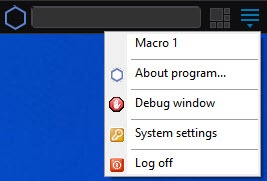
- Select the
- Debug window item
- in the main control panel
- menu to display
- open the debug window on the monitor screen
- . The
- The selected Debug window menu
- item is marked with a checkbox
- tick.

To hide the debug window, you must reselect select the Debug window item in the main control panelmenu again.
| Info | ||
|---|---|---|
| ||
The debug mode slows down the system operation and increases the useand uses a lot of system resources. We strongly recommend enabling debug mode for debugging purposes only and disabling it after the configuration is complete. | ||
| Info | ||
| ||
when all the settings are completed. For more details about working with Debug on working with the debug window, see The Script object. Programming using the JScript language in the The see The Debug window section. |
...
Configure the parameters of log files
You can set the log-keeping parameters parameters for log file storage both on the settings panel of the Axxon PSIM settings panel in section in the tweaki Tweaki.exe utility (see The settings panel of the PSIM Base system section) and and using some parameters of registry keys:
- The Time of log keeping (hours) equals the DebugTime registry
- parameter is the same as the parameters of the DebugTime registry key. It specifies the number of hours for keeping the
- log file.
- files, 48 hours by default.
- The Maximum size (MB) equals the DebugSize
- parameter is the same as the parameters of the DebugSize registry key. It specifies the number of megabytes allocated
- provided for log.
- logs, 100 MB by default.
- The parameter of the DebugZipDays registry key enables the log
- logs' archiving mode
- in the .gz format and sets
- specifies the time period of
- for their storage.
- keeping, 2 days by default.
Log files are rewritten when overwritten when the maximum of one of the parameters reaches the maximumis reached.
When you enable the Debug 4 debug mode is enabled, the video.run log file displays the most detailed information about the file system and memory usage usage of each camera every 10 seconds. To reduce the number of info lines displayed information lines every 10 seconds to 6 six lines (this reduces the size of the log file), you must add the parameter of the StatusInfo=0 registry key.
The example Example of the displayed information when there is the if StatusInfo=1 or key or when it is absent:
| Code Block |
|---|
Uptime: 00:00:12, memory: 423.0 MB [FS]Health ok. [FS]Ring cycles count: 0 [FS]Total index in memory size: 62.7 KB [FS]Total recorders: 4, MemFile: -1, memFile total size: 16.0 MB, last frame skipped time: none, WritingQueueSize: 1500, avg speed: 18.99 MB/sec. [FS]Total readers: 0 (cached frames: 0) [FS]Total cameras: 4, internal VMDA detectors: 0, external VMDA detectors: 0. zone detectors: 0. [FS]Camera 1. Writing queue: 1 frames(0% of 1500), size: 0.00 MB(0 ms). Streams(1): 1, total VMDA detectors 0 (int: 0, ext: 0), zone: 0. Grabber_IP_CAM queue size: 0. [FS]Camera 2. Writing queue: 0 frames(0% of 1500), size: 0.00 MB(0 ms). Streams(1): 2, total VMDA detectors 0 (int: 0, ext: 0), zone: 0. Grabber_IP_CAM queue size: 0. [FS]Camera 3. Writing queue: 0 frames(0% of 1500), size: 0.00 MB(0 ms). Streams(1): 3, total VMDA detectors 0 (int: 0, ext: 0), zone: 0. Grabber_IP_CAM queue size: 0. [FS]Camera 4. Writing queue: 0 frames(0% of 1500), size: 0.00 MB(0 ms). Streams(1): 4, total VMDA detectors 0 (int: 0, ext: 0), zone: 0. Grabber_IP_CAM queue size: 0. Total registered senders: 1 Objects: VideoFrame: 38(max: 77 at '09-09-22 14:40:13.014') AudioFrame: 0(max: 5 at '09-09-22 14:40:08.816') Msg: 73(max: 130 at '09-09-22 14:40:06.733') Active[1] SendVideoFrame(local=1,compressed=1) to 'TAG-5509.1': value: 0 (max 0), delay = 46 ms, 09-09-22 14:40:15.548 Inactive[0](no new data for more than 15 seconds) |
The example Example of the displayed information if StatusInfo=0:
| Code Block |
|---|
Uptime: 00:00:12, memory: 427.0 MB [FS]Health ok. [FS]Ring cycles count: 0 [FS]Total index in memory size: 52.9 KB [FS]Total recorders: 4, MemFile: -1, memFile total size: 16.0 MB, last frame skipped time: none, WritingQueueSize: 1500, avg speed: 7.42 MB/sec. [FS]Total readers: 0 (cached frames: 0). |
For more information about on registry keys, see Registry keys reference guide.
Example.
The Time Time of log keeping (hours) is 720 hours (1 month), and the log the Maximum size (MB) of a log is 100 MB.
In a week after the log recording startsOne week later, the size of the log file is already 100 MB. In this case, it is rewritten, starts to be overwritten, even though the log is kept for has been stored less than the specified periodtime.
And if you assign the value to the DebugZipDays parameter in the registry that is equal to the period in days during which logs must be keptIf you set a value equal to the number of days for storing logs to the parameter of the DebugZipDays registry key, then when the maximum size is reached, logs aren't removed—they are archived in the the logs are not deleted but instead are zipped into a *.gz format archive and are kept for as long as it is specified in stored for the number of days specified in the value of the DebugZipDays parameter.
Overview
Content Tools