
Go to documentation repository


Page History
The idb.exe utility is used for administering the databases of Axxon PSIM. For information on how to use the utility for administering databases, see the see Appendix 3. Axxon PSIM software database management section.
| Info | ||
|---|---|---|
| ||
| When you work with the idb.exe utility,the Windows Firewall/ICS system service must be enabled. |
...
| Info | ||
|---|---|---|
| ||
If you select the unsupported data supplierprovider, the window with the corresponding warning appears: |

To save the parameters in the Connection string field, do the following before you switch to the administration of another database:
- Make sure that the database for which the connection settings must be saved is selected in the Select data source list (1).
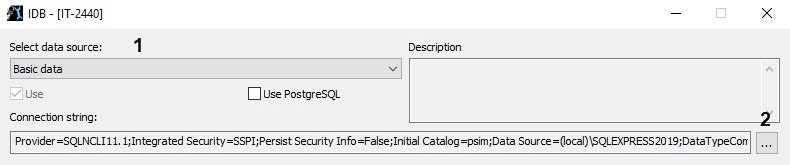
- Click the
 button (2).
 - In the Data Link Properties window that opens, go to the All tab (3).

- Select the Persist Security Info initialization property (4).
- Click the Edit Value... button.
As a result, the Edit Property Value window opens.Info title Note You can open the Edit Property Value window by left- double-clicking the left mouse button on the property name.
- From the Property Value drop-down list (5), select the True value (5).
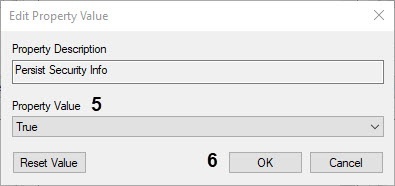
- Click OK (6).
- Click OK in the Data Link Properties window to update the settings and close the window.
- Click OK in the idb.exe utility to save the settings.
...
Overview
Content Tools