
Go to documentation repository


Page History
The STX-1000 controller connection is is configured as follows:
- Go to the settings panel of the STX -1000 objectReader object, which is created on the basis of the Controller groupthe transport channel object.
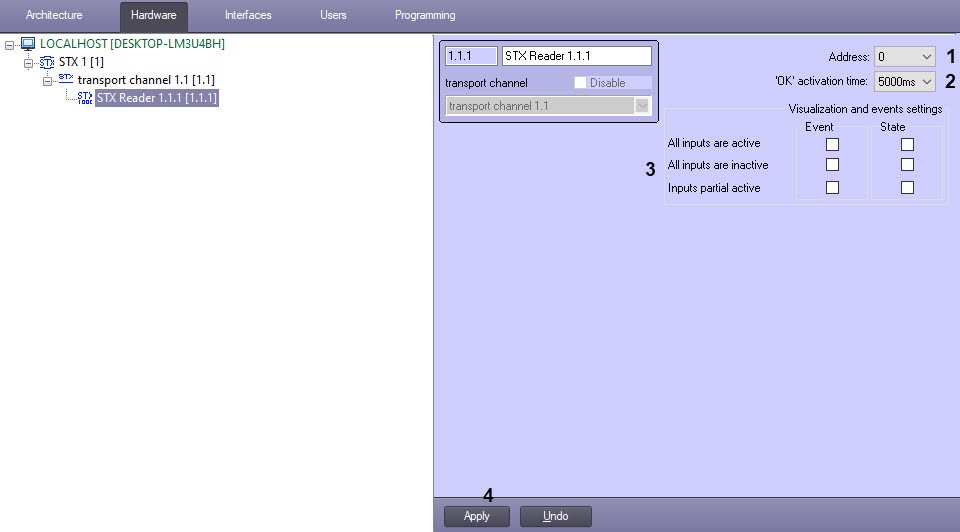
- In the Address field (1), enter the physical address of the controller.In the Ping (sec) field (
From the 'OK' activation time drop-down list (2),
enterselect the time
period of checking the device communication status in seconds.In the Polling rate (sec) field (3), enter the time period of requesting the controller events in secondsin milliseconds for which the "OK" LED on the device will be turned on when the corresponding command is sent from the Map. Also, the "OK" LED may blink when Blink is selected.
Configure the events receiving and states changing (3):
Inputs activity Event State All inputs are active If the checkbox is set, the event will be received only if all inputs are active If the checkbox is set and all inputs are active, then the state of these inputs will change on the Map All inputs are inactive If the checkbox is set, the event will be received only if all inputs are inactive If the checkbox is set and all inputs are inactive, then the state of these inputs will change on the Map Inputs partial active If the checkbox is set, the event will be received even if only some of the inputs are active If the checkbox is set, the state of all active inputs will change on the Map Info title Note Only input objects created in the tree are taken into account. For example, if only 2 out of 4 inputs are created, then the events and states will be monitored only for these 2 inputs.
- Click the Apply button (4).
The STX-1000 controller connection is is now configured.
Overview
Content Tools