
Go to documentation repository


Page History
The Web-server object is used for viewing the video surveillance information from an Internet via a web browser and the TCP/IP communication environment. The The settings panel of the Web-server object is shown in figureand its description are given below.
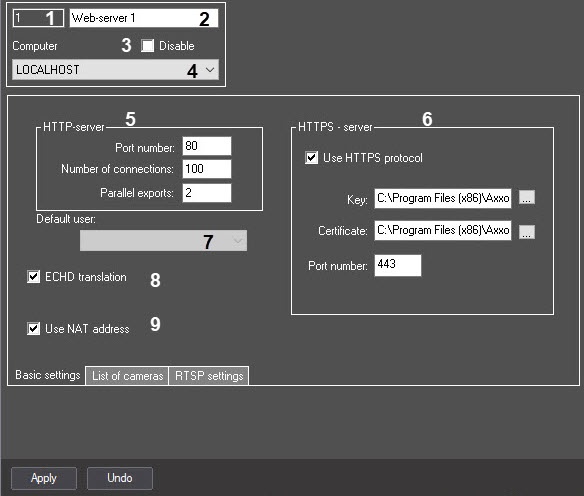
The Basic settings tab

List of cameras tab
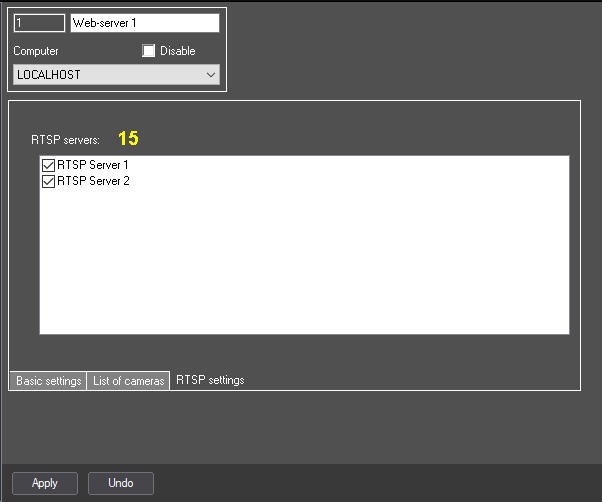
Table describes the parameters of the settings corresponding to the elements of the settings panel of the Web-server object.
№ | Parameter | Method | ||||
of setting the parameter value | Parameter description | |||||
Representation | Default value | Value range | ||||
1 | The Identification number* | Automatically | Displays the identification number of the Web | |||
server object in the | ||||||
video surveillance system | ||||||
with distributed architecture | Sequence of numbers | |||||
Depends on the number of the Web | ||||||
server objects in the | ||||||
video surveillance system | ||||||
with distributed architecture | From 1 to 2147483647 | |||||
2 | The Name* | |||||
Enter the value in the field | Sets the name of the Web | |||||
server object in the | ||||||
video surveillance system | ||||||
with distributed architecture | Latin alphabet, Cyrillic, digits and service characters | Web-server | A line containing a sequence of any | |||
characters (letters, digits, service characters | ||||||
except > and < | ||||||
characters), | ||||||
case- | ||||||
insensitive. Number of | ||||||
characters—from 1 to 60 | ||||||
3 | The Disable | |||||
checkbox | ||||||
Set the checkbox | Disables the Web server object in the video surveillance system with distributed architecture | Boolean type | ||||
Clear | ||||||
Set—the Web | ||||||
server object is disabled and | ||||||
isn't used Clear—the Web server | ||||||
object is enabled and | ||||||
used | ||||||
4 | The Computer | |||||
drop-down list | Select the value from the list | Sets the Computer parent | ||||
object of the | ||||||
system with distributed architecture to which the given Web | ||||||
server object | ||||||
belongs | ||||||
Names of the Computer objects registered in the system | Name of the Computer parent | |||||
object | Depends on the number of the Computer objects in the | |||||
video surveillance system with distributed architecture | ||||||
| The HTTP-server group | ||||||
5 | ||||||
The Port number | ||||||
Enter the value | ||||||
in the field | Sets the number of the port used by the HTTP server (used for video surveillance | |||||
via a web browser, including through the internet) | Sequence of numbers | 80 | Any | |||
valid unused port numbers | ||||||
. The number of ports is | ||||||
determined by the system administrator | ||||||
6 | ||||||
The Number of connections | ||||||
Enter the value in the field | Sets the maximum | |||||
possible number of connections to the | ||||||
server via the Web | ||||||
server module. Each request to view the video signal from each camera | ||||||
and each request to control all PTZ devices, regardless of their number, is considered as a | ||||||
connection | ||||||
| Sequence of numbers | 100 | Any integer. | ||||
If you specify the | ||||||
0 value | ||||||
Without a group | ||||||
7 | Default user | Selected in the list | Sets the user with rights and authorities to conduct video surveillance from the Remote Workstation via the Web-server | The names of users registered in the system and added to the rights | Not set | Depends on the number of users registered in Axxon PSIM™ |
8 | ECHD translation | Set the checkbox | Enables http requests used for integration with ECHD. | Boolean type | No | Yes – requests used for integration with ECHD are performed for the Camera objects under which the ECHD channel objects are created. No – requests used for integration with ECHD are not performed. |
9 | RTSP-server | Select value from the list | Sets rtsp server to process ECHD requests | Names of rtsp Server objects registered in the system | Not set | Depends on the number of rtsp Server objects in distributed digital surveillance system. | 10 | Use NAT address | Set the checkbox | Enables router address substitution in ECHD requests | Boolean type | No | Yes – when requesting the URL of streams through the HTTP API, the IP address of the router specified in the settings panel of the RTSP Server object is substituted in response to the request.
The HTTPS server group | 11 | HTTPS protocolSet checkbox | Enabling HTTPS protocol when transferring data via Web-server. | Boolean type | No | Yes – HTTPS protocol is in use. No – HTTPS protocol is not in use. | 12 |
in the video surveillance monitor of the Web-server module, video signals aren't displayed | ||||||
The Parallel exports | Enter the value in the field | Determines the maximum allowed number of archive files to be uploaded simultaneously | Sequence of numbers | 2 | From 1 and above. If you leave the field blank, the lowest possible value is used | |
The HTTPS-server group | ||||||
6 | The Use HTTPS protocol | Set the checkbox | Enables the HTTPS protocol when you transmit data via the Web server module | Boolean type | Clear | Set—the HTTPS protocol is used Clear—the HTTPS protocol isn't used |
The Key | ||||||
Enter the value in the field | ||||||
Sets the path to the folder of the key for data | ||||||
transmission via the HTTPS protocol | ||||||
Latin alphabet, Cyrillic | ||||||
and service characters | C:\Program Files (x86)\Axxon PSIM\Modules\SSL\ssl_internal.key | Depends on the location of data encryption key when | ||||
you transmit data via the HTTPS protocol | ||||||
The Certificate | ||||||
field | Enter the value | |||||
in the field | ||||||
Sets the path to the folder of the certificate for data | ||||||
transmission via the HTTPS protocol | ||||||
Latin alphabet, Cyrillic | ||||||
, and service characters | C:\Program Files (x86)\Axxon PSIM\Modules\SSL\ssl_internal.cert | Depends on the location of certificate file when | ||||
you transmit data via the HTTPS protocol | ||||||
14 | ||||||
The Port number | Enter the value in the field | Sets the number of the port used for the HTTPS server (used for video surveillance in | ||||
a web browser and | ||||||
via the | ||||||
internet) | ||||||
Sequence of numbers | ||||||
443 | Any | |||||
available unused port numbers | ||||||
. The number of ports is | ||||||
determined by the system administrator | ||||||
| Out of the group | ||||||
7 | The Default user | Select the value from the list | Sets the user with rights and authority to conduct the video surveillance from the Remote workstation using the Web server module | Names of the users registered in the system and added to the rights | NA | Depends on the number of users registered in Axxon PSIM |
8 | The ECHD translation | Set the checkbox | Enables the use of the HTTP requests used for integration with ECHD | Boolean type | Clear | Set—requests used for integration with ECHD are executed for the Camera objects on the basis of which the ECHD channel objects are created Clear—requests used for integration with ECHD aren't executed |
| 9 | The Use NAT address checkbox | Set the checkbox | Enables the router address substitution in the ECHD requests | Boolean type | Clear | Set—when you request the URL streams via the HTTP API, the IP address of the router specified in the settings panel of the RTSP Server object is substituted in the response to the request Clear—when you request the URL streams via the HTTP API, the IP address of the server in its local network is returned in response to the request |
The List of cameras tab
15 | Range | |||||
№ | Parameter | Method of setting the parameter value | Parameter description | Representation | Default value | Value range |
10 | The Range | 16 | Clear | |||
Click the button | The box for adding cameras as a group is opened. | - | - | - | ||
Opens the window for bulk addition of cameras (see Bulk selecting and configuring cameras for the Web-server) | NA | NA | NA | |||
11 | The Clear | |||||
Click the button | ||||||
Clears the list of the added cameras | ||||||
| NA | ||||||
| NA | ||||||
| NA | ||||||
12 | The Add all | Click the button | ||||
Adds to the list of cameras all Camera objects created in the system | - | - | - | 18 | Number | |
| NA | NA | NA | ||||
13 | The Number | Select the value from | ||||
the list | Sets the number of the camera the video from which is transmitted to the remote workstation | |||||
via the Web | ||||||
server module | ||||||
Identifiers of the Camera objects registered in the system | ||||||
| NA | Depends on the number of cameras in the | |||||
video surveillance system | 19 | Camera | ||||
with distributed architecture | ||||||
The Camera | Select the value from | |||||
the list | Sets the name of the | |||||
camera the video from which is transmitted to the | ||||||
remote workstation via the Web | ||||||
server module | ||||||
Names of the Camera objects registered in the system | ||||||
| NA | Depends on the number of | |||||
cameras in the | ||||||
video surveillance system with distributed architecture | 20 | |||||
The Video stream | ||||||
drop-down list | Select the value from the list | Sets the number of the video stream used for displaying in the interface of the Web | ||||
server | ||||||
module | Numbers of video streams enabled on the camera and the By default value | By default | Depends on the number of the camera enabled streams | 21 | ||
The Live video | ||||||
drop-down list | Select the value from the list | Sets the source of live video | ||||
that is displayed in the interface of the Web | ||||||
server | ||||||
module | Available means to get live video | |||||
server | Server | |||||
—live video is received from the | ||||||
server to which the camera is connected. Videogate | ||||||
—live video is received | ||||||
through the videogate. Note. If a camera | ||||||
isn't configured to transmit video through the | ||||||
videogate, | ||||||
this item is unavailable in the list | ||||||
22 | Archive | |||||
The Archive | Select the value from | |||||
the list | Sets the source of | |||||
the archive video that is displayed in the interface of the Web | ||||||
server | ||||||
module | Available means to get archive video | |||||
server |
| |||||
| ||||||
| ||||||
| ||||||
| ||||||
| ||||||
| ||||||
| ||||||
| ||||||
| ||||||
| ||||||
| ||||||
| ||||||
The Microphone | Select the value from the list | Sets the name of the | 23 | Microphone | Select from a list | Specifies the name of |
microphone associated with the camera, the audio from which | ||||||
is transmitted through the Web | ||||||
server module | Names of | |||||
the Microphone objects registered in the system | ||||||
| NA | Depends on the number of | |||||
the Microphone objects in the video surveillance system with distributed architecture | 24 | |||||
The Speaker | ||||||
Select the value from | ||||||
the list | ||||||
Sets the name of the speaker associated with the camera | ||||||
, which is used to play back the audio received from the client | Names of | |||||
the Speaker objects registered in the system | ||||||
| NA | Depends on the number of | |||||
the Speaker objects in the video surveillance system with distributed architecture | 25 | Compression | ||||
The Compression | Select the value from | |||||
the list | Sets the compression | |||||
level of the video signal transmitted to | Reference compression ratios | Not specified | ||||
the remote workstations using the Web server module. Increasing the level of compression leads to the deterioration of the video signal quality | Reference compression levels | NA | Not defined, from 1 to 5. The 1 value corresponds to the minimum compression level, the 5—to the maximum compression level. If the compression level isn't specified, the video signal is transmitted with the same compression | |||
level as set for recording | ||||||
and transmitting videos to the network | ||||||
The Control | Select the value from | 26 | Control | Selected in |||
the list | ||||||
Enables the camera control (arm/disarm, PTZ, recording to the archive) | ||||||
according to the user rights | ||||||
Boolean type | Enabled | Enabled | ||||
—camera control | ||||||
according to the user rights is enabled | ||||||
Disabled | ||||||
—camera control is disabled regardless | ||||||
of the user rights | ||||||
| 14 | The PTZ control | |||||
| drop-down list | Select the value from the list | |||||
| Sets the | ||||||
| priority of the PTZ control during video surveillance using | ||||||
| a web browser | Names of the PTZ control priorities | Low priority |
| |||
| ||||||
| ||||||
| ||||||
| ||||||
| ||||||
|
The RTSP settings tab
№ | Parameter | Method of setting the parameter value | Parameter description | Representation | Default value | Value range |
| 15 | The RTSP server | Automatically | Displays the list of the RTSP Server objects registered in the system to process ECHD requests | Name of the RTSP Server objects | NA | List of the RTSP Server objects registered in the system to process ECHD requests |
The RTSP server | Set the checkbox | Selects from the list (one or several) the RTSP Server objects registered in the system to process ECHD requests | Boolean type | Clear | Set—RTSP server is used to process ECHD requests Clear—RTSP server isn't used to process ECHD requests |
*Name of the element isn't *The name of the element is not displayed in the settings panel of the given object.
Overview
Content Tools