
Go to documentation repository


Page History
General information
Axxon One allows you to send text notifications to Telegram chat when any event occurs from the objects registered in the Axxon One object tree. Once configured, the notification sending is initiated by a macro.
...
| Info | ||
|---|---|---|
| ||
For the correct operation of Telegram bot and notification sending, the user who created the bot must have @username specified in Telegram. |
Configuring an action
To configure notification sending via Telegram bot, do the following:
- Go to the Programming tab.
- In the Event rules or Cycle rules list, click Create... (see Configuring macros).
- Select a start condition that triggers a macro (see Configuring start conditions).
- Click the
 button below start conditions.
 - From the drop-down list, select General: Execute web query.
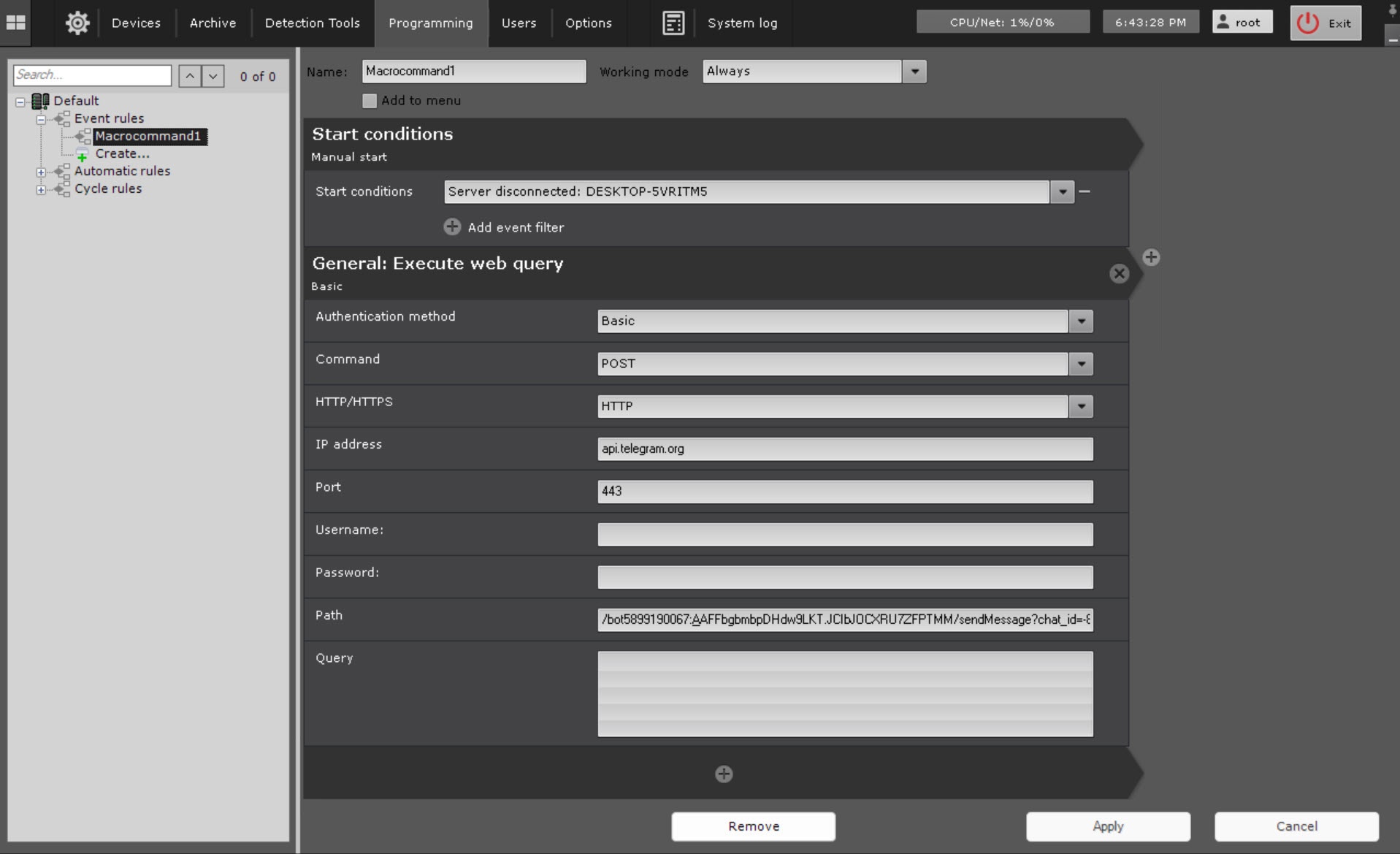
- In the Authentication method parameter, select the authentication method:
- Basic (default);
- Digest.
- In the Command parameter, select the query type:
- POST (defaul);
- GET;
- PUT;
- DELETE.
- In the HTTP/HTTPS parameter, select the server protocol:
- HTTP;
- HTTPS.
Note title Attention! For the correct notifications sending, you must select the HTTPS protocol.
- In the IP address parameter, enter the IP address of the Telegram server—api.telegram.org.
- In the Port parameter, enter the port of the Telegram server—443.
- In the Path parameter, enter the path of the query. The path of the query must look like this: /bot<BOTToken>/sendMessage?chat_id=<СhatID><ChatID>&&text=<Text>, where <BOTToken> is an ID of the bot in Telegram;
Info title Note The ID is provided when you create the bot
<СhatID> <ChatID> is the ID of the chat;
Info title Note To learn the ID of the chat, add the @RawDataBot bot to the chat. After adding, the bot will send a message to the chat that will contain the result of the execution of the getUpdates function. Find ChatId in the message. Then remove the @RawDataBot bot from the chat.
<Text> is a notification text. You can enter the set of US-ASCII characters (Latin characters and digits) in the notification text. For the notification text to display correctly with other characters and punctuation marks, you need to encode them. The encoding is described in the RFC 3986 standard and called URL-encoding, URLencoded, or percent-encoding. For example, a space character is encoded as %20.
- Click the Apply
 button.
...
Overview
Content Tools