
Go to documentation repository


Page History
Axxon PSIMsoftware supports automatic video recording upon alarm events registration for each Camera system object individually. By default, the auto-recording option is enabled for all cameras registered in the Hardware tab.
You can disable the auto-recording option upon alarms for each camera individually as well.
To disable the auto-recording upon alarm option event registration for a selected camera, do the following:
- Go to the Hardware tab in the System settings window.
- Select the Camera object corresponding to the required camera in the objects tree. The settings panel for the selected object is displayed on the right of the Hardware tab.object tree that corresponds to the adjusted camera.
- Select Go to the Basic settings tab on the settings panel of the Camera object.
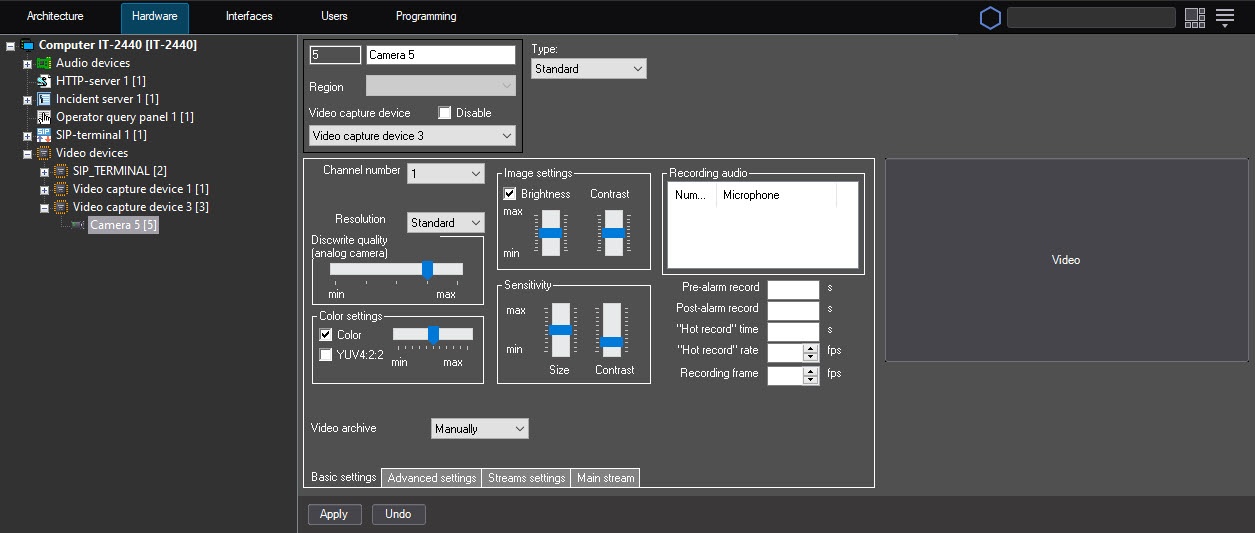
- Clear the Record alarms checkbox.From the Video archive drop-down list, select the Manually value.
- Click the Apply button.
Disabling automatic recording upon alarm event registration for a selected camera is complete.
| Info | ||
|---|---|---|
| ||
| To re-enable the auto recording option upon alarm event registration, repeat the above steps and set select the Record alarms checkbox On alarms value from the Video archive drop-down list. |
| Tip |
|---|
Overview
Content Tools