
Go to documentation repository


Page History
...
If there is sound with live video or the archive is recorded with sound, then video broadcast with sound through RTSP Server is supported – for supported—for this specify the ID of microphone from which the archive is recorded when requesting video (see the table with requests examples). For proper operation of this feature set the VLC media player compatibility mode checkbox checked in VLC Media Player (see item 14).
...
- Go to the RTSP Server object settings panel.
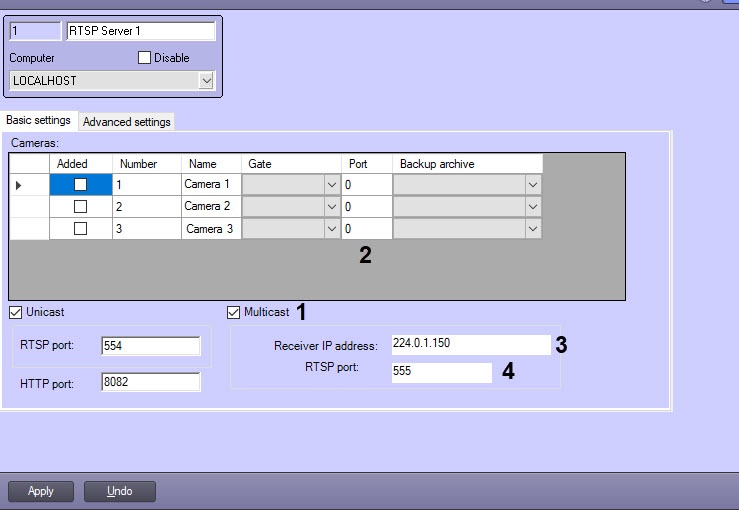
Set the Multicast checkbox (1). The Port column is displayed in the Cameras table.
Specify a data transmission port for each video camera in the Port field (2). Bear in mind the following when specifying ports:
- The following ports are in use for each camera in the Multicast mode: nPort, nPort + 18000 (rtp), nPort + 19000 (rtcp), where nPort – port nPort—port number specified for camera in the Port column.
For proper operation of RTSP server in the Multicast mode these ports are to be vacant. - Specified ports are not addressed directly. Use RTSP port to get video from all cameras in the Multicast mode (see item 12).
In spite of specifying video data port it is required to specify camera number in the data source address (see the table below).
- The following ports are in use for each camera in the Multicast mode: nPort, nPort + 18000 (rtp), nPort + 19000 (rtcp), where nPort – port nPort—port number specified for camera in the Port column.
In the Receiver IP address field (3) specify the address from which the broadcast in Multicast mode will be performed. Address is to be in range from 224.0.1.0 to 239.255.255.255. By default, the receiver IP is 224.0.1.150. Bear in mind the following when specifying Receiver IP address:
224.0.0.0-224.0.0.255 address range is reserved for routing protocols and other service protocols. Destination IP address cannot be set from the specified range.
RTSP-server can broadcast to one network simultaneously. The network with minimal metric is selected by default. To change the broadcast network, go to the Advanced settings tab (see below).
- Set different Receiver IP address and RTSP port if several RTSP Servers are in Multicast mode.
- In the RTSP port field (4) specify the number of port through which video signal will be sent in the Multicast mode. When requesting video data from the camera using the RTSP protocol, it is necessary to specify this port. The system itself forwards the request to the port of the requested camera.
...
- Go to the Advanced settings tab.
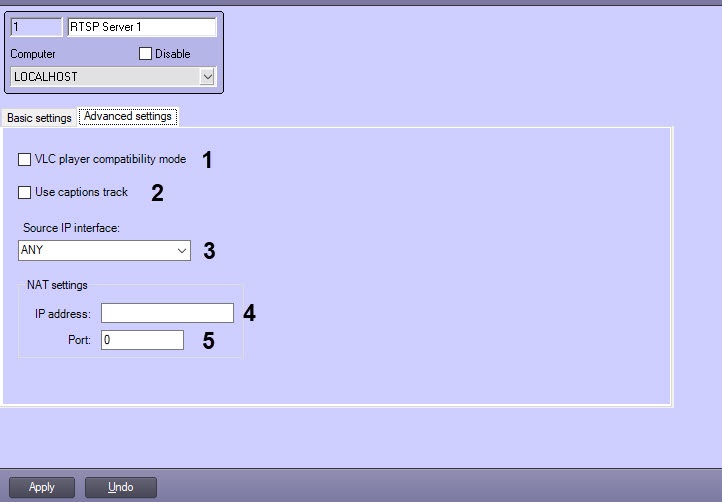
If the current time is to be sent to VLC Media Player instead of the frame time, then set the VLC player compatibility mode checkbox checked (1). This option is to be used in case of problems when playing back the archive received over RTSP in VLC Media Player.
If there are captions on the video (see Configuring captions display on a video image), set the Use captions track checkbox checked to send them along with video via RTSP Server and to display them in the receiving app – VLC app—VLC player (2).
Also, when this checkbox is set, time captions are added to the video image in the format YYYYMMDDTHHMMSSZ. If the video is archive (see request examples below), then the captions show the archive time. However, if the VLC player compatibility mode is set along with the Use captions track check box, the time in the captions is current.Note title Attention! Correct video and captions operation are enabled only in VLC Media Player 2.0.0. These features are not guaranteed to work in other versions of VLC Media Player or other programs.
From the Source IP interface drop-down list, select the name of the network interface that should be used to broadcast the RTSP server (3).
If the RTSP Server is used for broadcasting the video data to the Single Data Center (ECHD), and the Video Surveillance Servers are behind NAT, then it is necessary to specify the NAT settings:
In the IP address field, specify the IP address of the router that performs the NAT broadcasting (4).
In the Port field, specify the port of the router, which is accessed by the client when executing the Single Data Center (ECHD) requests (5).
Info title Note To enable the substitution of the router's specified IP address and port to the Single Data Center (ECHD) requests, it is necessary to set the corresponding checkbox in the settings panel of the Web server object—see Enabling the processing of ECHD requests and selecting rtsp server.
Click the Apply button to save the changes.
...
Address | Example | Description |
rtsp://ServerIP address[:Port]/CameraNo[?stream_id=StreamNo] | rtsp://127.0.0.1/1 | Viewing default stream from Camera 1 if default port is in use. |
| rtsp://127.0.0.1:555/1 | Viewing default stream from Camera 1 when broadcasting in Multicast mode if default port 555 is in use. Note. Connection to the RTSP stream is performed via the broadcasting adapter IP-address, not by the destination IP which is specified in the settings panel of the RTSP Server and is used internally | |
| rtsp://127.0.0.1:555/7?stream_id=7.2 | Viewing second stream from Camera 7 | |
| rtsp://Login:Password@ServerIP address[:Port]/CameraNo | rtsp://login:pass@127.0.0.1:554/1 | Viewing video signal from Camera 1 if users and permissions are configured in Intellect (see Rights administration) |
| rtsp://login:pass@127.0.0.1:555/1 | Viewing video signal from Camera 1 in Multicast mode if users and permissions are configured in Intellect | |
| rtsp://Server IP address[:Port]/CameraNo?mic_id=Microphone ID | rtsp://127.0.0.1:555/15?mic_id=1 | Viewing video from Camera 15 with sound |
| rtsp:// Server IP address[:Port]/?mic_id= Microphone ID | rtsp://127.0.0.1:555/?mic_id=1 | Getting sound only from microphone 1 with no video from any camera |
rtsp:// ServerIP address[:Port]/archive?id= CameraNo.&time_begin=yyyy.mm.dd-hh:mm:ss&&time_end= yyyy.mm.dd-hh:mm:ss | rtsp://127.0.0.1:554/archive?id=1&time_begin=2011.11.11-11:11:11&&time_end=2011.11.11-11:12:00 | Viewing video archive from Camera 1 for specified time period |
| rtsp:// Server IP address[:Port]/archive?id=CameraNo&mic_id= Microphone ID &time_begin=yyyy.mm.dd-hh:mm:ss&&time_end= yyyy.mm.dd-hh:mm:ss | rtsp://127.0.0.1:554/archive?id=1&mic_id=1&time_begin=2011.11.11-11:11:11&&time_end=2011.11.11-11:12:00 | Viewing video archive from Camera 1 with sound from microphone 1 for specified time period |
| rtsp://ServerIP address[:Port]/archive?id=CameraNo.&time_begin=yyyymmddThhmmssZ&time_end=yyyymmddThhmmssZ | rtsp://127.0.0.1:555/archive?id=1&time_begin=20160331T080000Z&time_end=20160331T080800Z | Viewing video archive from Camera 1 for specified time period |
| rtsp://ServerIP address[:Port]/archive?id=CameraNo.&time_begin=yyyymmddThhmmssZ | rtsp://127.0.0.1:555/archive?id=4&time_begin=20160316T065000Z | Viewing video archive from Camera 4 from specific start time till the archive end (as the value of time_end is not specified in the address) |
| rtsp://ServerIP address[:Port]/archive?id=CameraNo | rtsp://127.0.0.1:555/archive?id=4 | Viewing video archive from Camera 4 from the beginning till the end |
| rtsp://ServerIP address[:Port]/archive?id=CameraNo.&long_term_archive=BackupArchiveNo | rtsp://127.0.0.1:559/archive?id=1&long_term_archive=2 | Viewing Camera 1 video archive from Backup archive 2 |
| rtsp://Server IP address[:Port]/archive?id=CameraNo.&gate=VideogateNo | rtsp://127.0.0.1:559/archive?id=1&gate=3 | Viewing Camera 1 video archive from Video gate 3 |
| rtsp://Server IP address[:Port]/archive?id=CameraNo.&time_begin=yyyymmddThhmmssZ&time_end=yyyymmddThhmmssZ&z=PlayBackSpeed | rtsp://127.0.0.1:554/archive?id=2&time_begin=20171120T102000Z&time_end=20171120T104000Z&z=-1 | Speed-down playing back video archive of Camera 2 for the specified period of time. Value of z parameter greater than 0 (valid values are 2, 4, 6 ... 16) enables speed-up archive playback. If the parameter z is less than 0 (valid values are -1, -2, ... -16), then the archive is played back in the reverse order with the corresponding acceleration. Only key frames are played back at reverse playing |
| rtsp://Server IP address[:Port]/archive?id=CameraNo.&time_begin=yyyymmddThhmmssZ&time_end=yyyymmddThhmmssZ&long_term_archive=BackupArchNo | rtsp://127.0.0.1:554/archive?id=2&time_begin=20201117T110200Z&time_end=20201117T114900Z&long_term_archive=1 | Retrieve camera 2 records from backup archive 1, starting from 14:02:00 UTC+4 on 11/17/2020 and ending at 14:49:00 UTC+4 on the same day. time_begin and time_end in the request are UTC+0 times. The specified Backup archive must be selected for the corresponding camera on the settings panel of the RTSP Server object. VLC player compatibility mode must be enabled to view in VLC Media Player |
...
Overview
Content Tools