
Go to documentation repository


Page History
...
To open this panel, click the  button button in the upper left corner of the screen.

To open the site or facility on an additional monitor (see Monitor Management), click the Object tree button on the left side of the screen.
| Info | ||
|---|---|---|
| ||
On Object Panel, the cameras can be sorted either by name or by a short name (see Configuring camera sorting on Objects Panel). You can search for objects inside the panel using the search bar, as in the search panel for video cameras (see Camera Search Panel). |
There are two display modes for the camera selected on the panel:
...
) |
...
. |
If the connection to the video camera is lost, it will be highlighted in red on the Object Panel.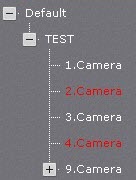
The object tree on the panel can be represented as Servers (1), Groups (2) and Layouts (3).
...
You can resize the Objects Panel according to your needs. To do this, left-click and drag the right border of the panel.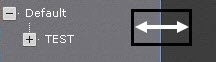
To hide the panel, click the  button button.
Overview
Content Tools