
Go to documentation repository


Page History
ANPR is a detection tool that reads license/number plates of vehicles in FoV.
| Note | ||
|---|---|---|
| ||
| ||
| Note | ||
| ||
|
To configure ANPR, do as follows:
- Download ANPR (VT) from the website and install it.
- Create the Select the License plate recognition (VT) object (1) and select it.
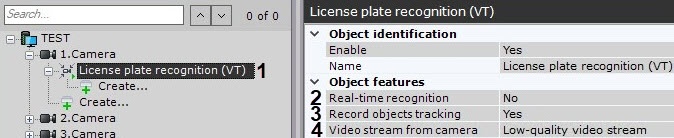
If you require using need to use this detection tool for real-time number license plate recognition, set the corresponding parameter to Yes (2)(see Configuring real-time vehicle license plate recognition), set the corresponding parameter to Yes (2).
- If you need to enable recording of metadata to the database, select select Yes from the Record objects tracking list (3).
- If a the camera supports multistreaming, select the stream for which detection is needed. Selecting a low-quality video stream allows reducing the load on the Server (4).
Select detection tool working mode: standard or neural (1).
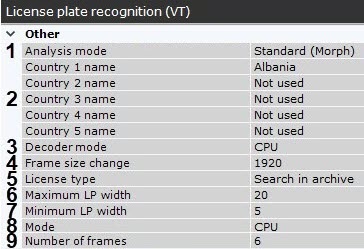
In the appropriate fields, select one or more countries for ANPR (2).
Note title ImportantAttention! - The more countries you select, the slower the recognition works and the greater the likelihood of the recognition error.
- To recognize the old USSR license plates, you need to select the corresponding country in the list.
- Select a processing resource for decoding video streams (3) (see Hardware requirements for GPU based video decoding). When you select a GPU, a stand-alone graphics card takes priority (when decoding with NVidia NVIDIA NVDEC chips). If there 's is no appropriate GPU, the decoding will use the Intel Quick Sync Video technology. Otherwise, CPU resources will be used for decoding.
Analyzed framed are scaled down to a specified resolution (4, 1920 pixels on the longer side). This is how it works:
If the longer side of the source image exceeds the value specified in the Frame size change field, it is divided by two.
If the resulting resolution falls below the specified value, it is used further.
If the resulting resolution still exceeds the specified limit, it is divided by two, etc.
Info title Note - For example, the source image resolution is 2048*1536, and the
- specified value is set to 1000.
- In this case, the source resolution will be
- halved two times (down to 512*384)
- , as after the first division, the number of pixels on the longer side exceeds the limit (1024 > 1000).
- If detection is performed on a higher resolution stream and detection errors occur, it is recommended to reduce the compression.
Select the current license type (5).
.License Description Search in archive Basic ANPR Search License.
Attention! This type of license provides a 30-sec delay between the number recognition and the corresponding event
noStandard (25 FPS or 6 FPS)
The 25 FPS license has a priority. The 6 FPS license is used only if you don't have
number25 FPS license. You cannot use the
no FPSlicense plate recognition function if you have
purchasednot purchased both licenses
fps. Fast speed (25 FPS)
The "Fast" license allows you to process video feeds up to 25
have to obtain an appropriate license to make ANPR work.FPS with a maximum vehicle speed of 150 km/h. You
6 FPScannot use the license plate recognition function if you have not purchased the license. Slow speed (6 FPS)
fpsThe "Slow" license allows you to process video feeds up to 6
have to obtain an appropriate license to make ANPR workFPS with a maximum vehicle speed of 20 km/h. You cannot use the license plate recognition function if you have not purchased the license. Note title ImportantAttention! - All license types except the standard one (Search in archive) require the hardware key or the software key activation (see Licensing of the software module for License plate recognition (VT)).
- You can use a 60-day trial key (see Licensing of the software module for License plate recognition (VT)).
Note title Important - You can use only a hardware key on virtual machines. To use a hardware key, select the Standard (25 FPS or 6 FPS) license type.
Set the maximum and minimum width of the vehicle number license plate as a percentage of the FoV width FOV width (6, 7).
Note title ImportantAttention! The Minimum LP width parameter affects the CPU load as follows: the higher the parameter is, the higher the load.
Choose a processor to run detection on (8, see Hardware requirements for License plate recognition (VT), General Information on Configuring Detection). In standard mode, detection runs on the CPU only. In neural network analysis mode, the algorithm runs on the NVIDIA GPU.
Set the number of frames required for LPR/ANPR (9). This is though a necessary condition, but it is not sufficient for the first output. This condition delays the LPR output. This parameter allows to increase increasing the reliability of the results, as well as to hide hiding false positives.
If necessary, configure the advanced detection settings (see Fine-tuning the VT number plate detection tool).
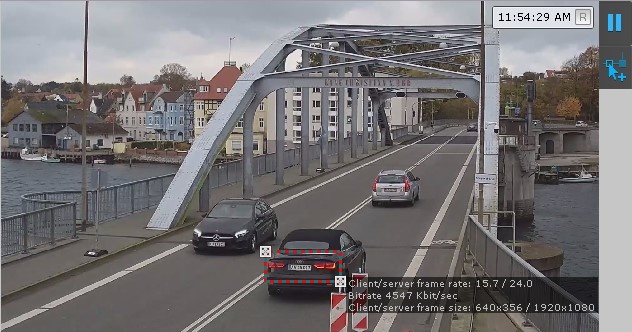
You can configure an the ANPR zone area in FOV. The zone area is resized by moving the anchor points.
Info title Note For - For your convenience, you can click
- the
 button and configure the mask on a still frame
- . To undo, click this button again.
title Note - Detection
- area is displayed by default. You can click
- the

- button to hide the
- area. To undo, click this button again.
- Click the Apply button.
Configuration of ANPR is now complete.
Overview
Content Tools