
Go to documentation repository


Page History
| Info | ||
|---|---|---|
| ||
Face recognition modules can operate in multi-threading mode. By default, all available processor cores are used. The number of processor cores actually used in the operation of the face recognition module is set using the CpuCoreCount registry key parameter (see Registry keys reference guide). |
To enable the face recognition, it is necessary to activate one of the software modules:
- Cognitec recognition module.
- VisionLabs recognition module. On the basis of the created object, it is also necessary to create an object representing the number of reference faces in the database.
- Tevian recognition Recognition module VA. On the basis of the created object, it is also necessary to create an object representing the number of reference faces in the database.
- STC recognition module.
- Face recognition VideoIntellect 1.1.
To activate the software module, it is necessary to create an object on the basis of the Face recognition server object Recognition Server object, and name it object with the same name as the required module.
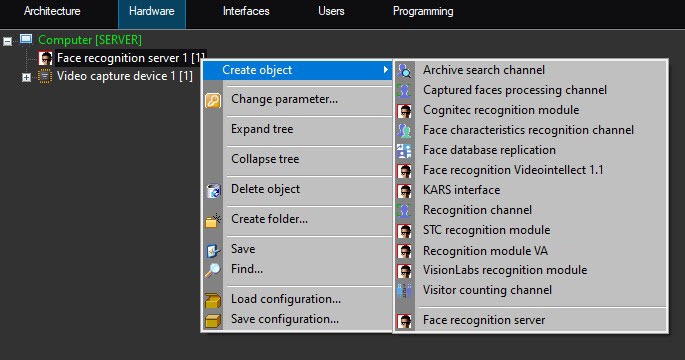
The following objects can also be created on the basis of the Face recognition server object:
- The Archive search channel module which is used for searching the captured face in the face database and viewing the video archive of the captured face.
TheFace characteristics recognition channelmodule which is used for the facial characteristics recognition the face characteristics recognition for a specified channel.
Note title Attention! The Face characteristics recognition channel module module can only operate with the Tevian or the VA or VideoIntellect 1.1 face face recognition module.
Info title Note If the Face characteristics recognition channel is not activated, then the facial face characteristics of all newly captured faces will be marked as Undefined in the Face recognition and search interface window. However, if this module is activated later, then as Face PSIM operates and accumulates data, the undefined facial face characteristics of already captured persons will be changed to averaged values.
This module provides the recognition of the following facial face characteristics:
age;
Info title Note If the age of the same person is determined with poor accuracy, then it is necessary to set the 1 or 5 value for the TevianVa.TrackBestFramesCount registry key parameter (for details, see Registry keys reference guide, for information about working with the registry, see Working with Windows OS registry).
gender;
emotion;
glasses;
facial hair;
hair color;
type of bald head;
headwear;
artificial face;
face concealment.
Info title Note If masked faces are not recognized, then it is necessary to set the 0 value for the Tevianthe Va.GlobalTrackingDetectionFilter registry key key parameter (for details, see Registry keys reference guide, for information about working with the registry, see Working with Windows OS registry).
The Visitor counting channel module which is used for counting visitors and repeated passes.
- The Face database replication module which is used for the Server face database replication server face database replication in a distributed configuration (see Face database replication).
- The Recognition channel and TevianVA/Cognitec/VisionLabs/STC/VideoIntellect 1.1 recognition modules which are used for real-time face recognition for the specified channel.
- The Captured faces processing channels module is used for capturing faces and determining their temperature in real time for the selected video channel. To use this channel, it is necessary to configure the Face detection object to work with a thermal camera (see Configuring the Face detection Detection module combined work with thermal camera or external system).
| Note | ||
|---|---|---|
| ||
After the Visitor counting channel, Archive search channel, Recognition channel, Face characteristics recognition channel and Captured faces processing channels modules are activated, it is necessary to select the required Face detection object on the settings panel of the corresponding object (see Configuring the recognition parameters of captured faces recognition parameters). |

Overview
Content Tools