
Go to documentation repository


When Axxon PSIM is connected to the camera with edge storage, then the video server performs recording of the video archive from the camera. If the connection is lost, then recording is performed to the edge storage only. It is possible to import the video archive (for the time period when the connection was lost) from edge storages to the Axxon PSIM file system when the connection is restored. The archive is imported as follows:
- Import to the main video server archive. The video server always records to the main archive. When you connect a camera, the main archive requests an archive from the edge storage for the period when the camera was disconnected from the server.
Import to the backup archive. The archive can be recorded onto several disks/partitions. When you connect a camera and activate the backup archive, the backup archive requests an archive from the edge storage for the period when the camera was disconnected from the server.
To configure import to the backup archive, select and configure cameras for copying to the backup archive—see Selecting and configuring the cameras for the Backup archive, as well as set the schedule for archive copying when the connection is lost—see Configuring the schedule of the video archive copying.
Attention!
You must create a separate Backup archive object to import from edge storage and for backing up the video server archive.
Thus, the video archive is always divided into two parts: the archive for the period when the connection was lost is located in a separate backup archive, and the archive for periods when there is a connection is located in the main and/or backup archive of the video server.
Attention!
In both cases, only the videos that were recorded during the period of disconnection from the server are imported to avoid duplication of videos.
If the import isn't completed for any reason, you can use a script to force the import (see IPSTORAGE Edge storage).
The time from which the synchronization must start is set by the SyncedTime parameter in the Settings.xml file—see XML file parameters reference guide. Also, the maximum possible synchronization period is set by the IpStorageSyncDepthHours key (see Registry keys reference guide). The time in the SyncedTime parameter can be changed when a new fragment appears in the archive provided that the synchronization is successful and forced by the UPDATE_TIME command (see IPSTORAGE Edge storage).
Attention!
We don't recommend viewing the archive in edge storage until the synchronization is complete to avoid video import.
You can enable the additional logging of the edge storage synchronization using the parameter of the LogFullIpStorageSyncInfo key of the registry section HKEY_LOCAL_MACHINE\SOFTWARE\AxxonSoft\PSIM\Video (see Registy keys reference guide. For information on how to work with the registry, see Working with Windows OS registry).
To enable import from edge storages, do the following:
- Go to the settings panel of the Edge storage object.
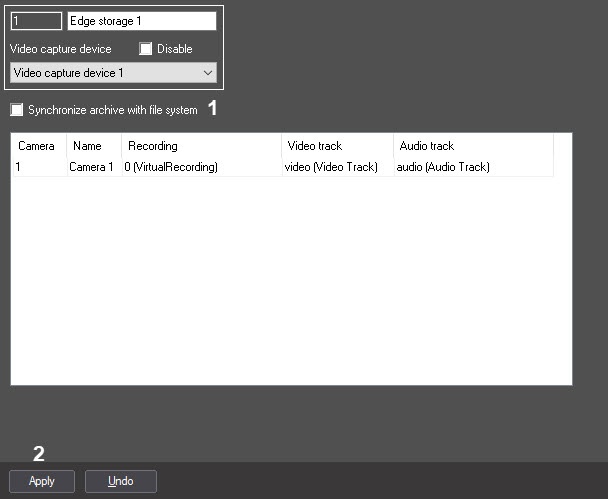
- Set the Synchronize archive with file system checkbox (1).
- Click the Apply button to save changes (2).
Import from edge storages is now enabled.
Overview
Content Tools