
Go to documentation repository

Documentation for Monitoring PSIM 1.0 (english)
Previous page Next page

Select an active Serverused by the Additional worksplace/Additional workplace of CSC as follows:
- Run the Additional workplace configuration tool.
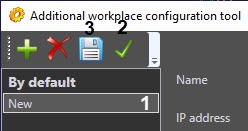
- Select the required Server in the list (1).
- Click the
 button (2).
 - Click the
 button (3).
Active Server is now selected.
Overview
Content Tools