Documentation for Auto PSIM 1.0.1.

Previous page Next page

You are viewing an old version of this page. View the current version.

Compare with Current View Page History

« Previous Version 5 Next »

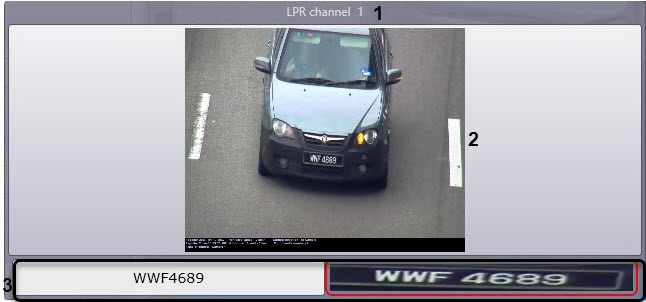
The passing vehicle data is displayed in the Events monitor window.
Note

The Events monitor component may not be displayed due to the corresponding system settings.

In the Events monitor window, the following data is displayed:

  1. LP recognizer (the name of the corresponding LPR channel object) (1);
  2. An image of a vehicle a caption, which can contain the following data (2):
    1. date and time of receiving the vehicle data;
    2. vehicle license plate;
    3. country;
    4. type of license plate (only for the Vehicle type recognition module, RR vendor and model recognizer module, or AR MMR module);
    5. vehicle speed;
    6. vehicle direction;
    7. speed, permitted on the controlled road area;
    8. ID of speed detector;
    9. control point—name of the camera that captured the vehicle;
    10. vehicle vendor (only for the Vehicle type recognition module, RR vendor and model recognizer module, or AR MMR module);
    11. vehicle model (only for the Vehicle type recognition module, RR vendor and model recognizer module, or AR MMR module);
    12. vehicle color (only for the Vehicle type recognition module, RR vendor and model recognizer module, or AR MMR module);
    13. other information about the speed detector (see Setting up the frame sign parameters).

      Note

      By double-clicking in a separate window, you can view the frame with a recognized vehicle. The set window sizes are saved after you restart the computer.

  3. Recognized LP number and the LP image (3).

    Note

    • If thelicense plate hasn't been recognized, the UNDEFINED message will be displayed in the field.
    • If the characters of the recognized license plate are displayed incorrectly, it is necessary to change the font of the recognized license plate to the one that will contain all the characters of the corresponding country license plates (see Setting up the font of the recognized LP number).
    • The image of the recognized license plate is compressed or stretched to fit the red frame. By double-clicking in a separate window, you can view the image of a recognized license plate. The set window sizes are saved after you restart the computer.

Note

  • In case the AUTO-Uragan or AR-Auto module is used for recognition, allowed speed, vehicle speed and ID of speed detector are displayed only if the Speed traps server module is connected.
  • In case the alarm is registered for a vehicle (overspeeding, and/or identification of a plate in the external plates database), the field with a video frame is highlighted in red (2).
  • No labels