In Auto PSIM, you can configure license plate recognition by macros and motion detection. To do this, do the following:
- Go to the settings panel of the LPR channel object, corresponding to the activated module (see Activating the software module used for identifying license plates).

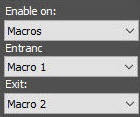
- From the Enable on drop-down list, select:
- Disabled—License plate recognition by macros or motion detection is disabled (by default). The LPR channel scans each incoming frame.
- Motion detection—License plate recognition by motion detection is enabled. It is used to reduce the load on the server.
- Macros—License plate recognition by macros is enabled. When you select this option, the Entrance and Exit drop-down lists become available.
- From the Entrance drop-down list, select a macro that starts the license plate recognition.
- from the Exit drop-down list, select a macro that stops the license plate recognition.
- Click the Apply button to save the settings.
Setting up license plate recognition by macros and motion detection is complete.


