- Install the OLE DB Driver for SQL SERVER driver by selecting the msoledbsql file that is located in the redist folder in the installation directory according to the language and bitness of the Remote Client, or fully install the SQL Server. Thus, the SQL Server on the computer with the installed Remote Client will be able to connect to the SQL Server on the computer with the Intellect Server.
- Ensure the SQL Server authentication through the base sa account.
- Ensure uninterrupted connection of the SQL Server on the computer with the installed Remote Client to the SQL Server on the computer with the installed Intellect Server.
- Configure the SQL Server to allow remote connections.
- Ensure the SQL Server authentication through the base sa account.
- Configure the Intellect Server connection to its database using the idb.exe utility. For this, do the following:
- Run the utility from the Intellect Server installation directory.
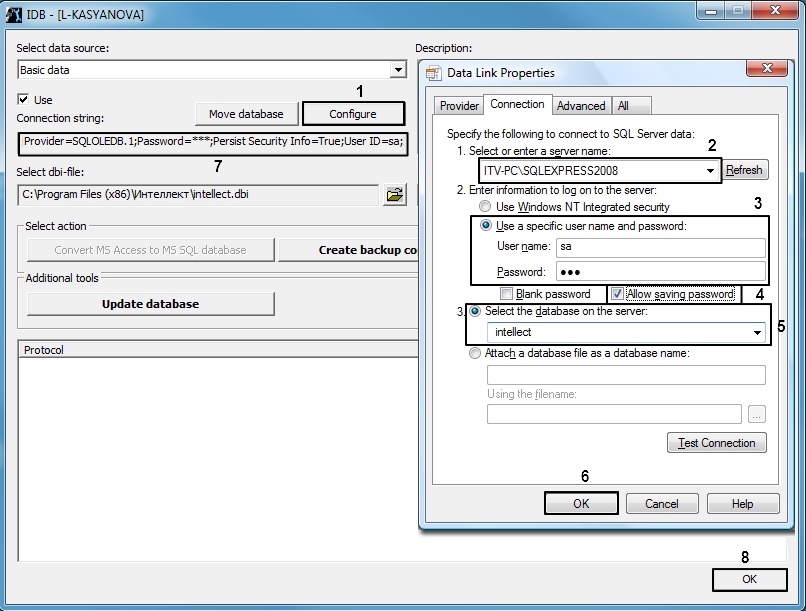
- In the utility interface, click the Configure button (1). The database connection window will open.
In the Select or enter a server name field (2), enter the name or the IP address of the SQL server used to for database management.
Note that you must specify the explicit name or the IP address of the machine on which the database is installed. The format (local)\ SQLEXPRESS would be incorrect.
In the Enter the information to log on to the server settings section (3), select the Use a specific user name and password radio button. In the User name field enter sa. In the Password field, enter the password for the sa user.
Note that user names other than sa are not allowed.
Set the Allow saving password checkbox (4).
This step is mandatory.
- Select the Select the database on the server radio button and select intellect from the drop-down list (5).
- Click the OK button to save the connection parameters (6). The parameters will be displayed in the Connection string field (7) in the idb.exe utility interface.
- Click the OK button (8) in the idb.exe utility interface to save the changes.
- Run the utility from the Intellect Server installation directory.