Go to the General settings tab on the settings panel of the Web-server object (1).
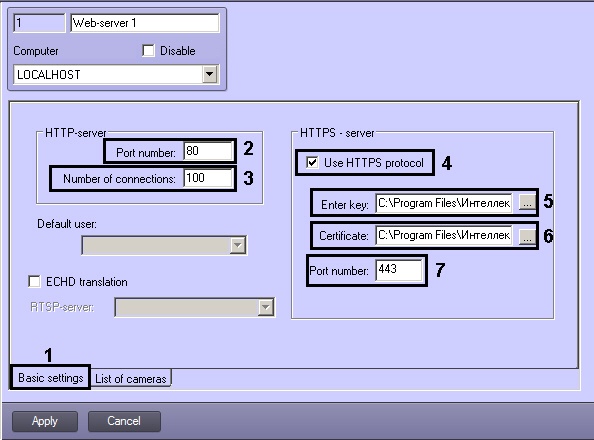
In the Number of connections field of the Http-server group specify the maximum permissible simultaneous connections to Web-server via Http protocol (2). The less there are connections, the less Server load is. This parameter is selected experimentally.
| Connections are used to receive video (live or archive), to receive audio (live or archive), to send audio to INTELLECT™, to get data on configuration, to send commands to INTELLECT™, etc. The Client can use the same connection to perform several actions. |
If data is to be transmitted via Web-server using HTTPS protocol, then perform the following settings in the HTTPS-server group:
- Set the Use HTTPS protocol checkbox checked (4).
- Specify path to the key file in the Key field using the
 button (5).
 - Specify path to the certificate file in the Certificate field using the button (6).
- In the Port number field of the HTTPS-sever group specify the port number in order to connect to HTTPS-server (7).