- Default - the default behavior set in the device settings.
- Only card - the user can get the access only by the card.
- Card And Fingerprint - the user can get the access if he first presents a card and then a fingerprint.
- Card and Pin - the user can get the access if he first presents a card and then enters a PIN code.
- Fingerprint Or Pin After Card - the user can get the access if he first presents a card and then either presents a fingerprint or enters a PIN code.
- Card And Fingerprint And Pin - the user can get the access if he presents a card, then a fingerprint and then enters a PIN code in this exact sequence.
- Cannot use - the user always gets the access by the card.
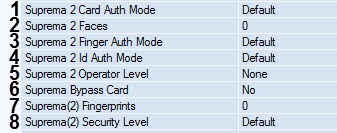
- Default - the default behavior set in the device settings.
- Only Fingerprint - the user can get the access only by presenting a fingerprint.
- Fingerprint And Pin - the user can get the access if he first presents a fingerprint and then enters a PIN code.
- Cannot use - the user always gets the access by presenting a fingerprint.
- Fingerprint After Id - the user can get the access if he first enters his ID (not a PIN code!), and then presents a fingerprint.
- Pin After Id - the user can get the access if he first enters his ID, and then the PIN code.
- Fingerprint Or Pin After Id - the user can get the access if he first enters his ID, and then either presents a fingerprint or enters a PIN code.
- Fingerprint And Pin After Id - the user can get the access if he first enters his ID, and then presents both a fingerprint and enters a PIN code.
- Cannot use - the user always gets access by entering his ID.
- None - the default value. The user does not have the access to the settings.
- Admin - the user has full access to the settings.
- System settings - the user has the access to the system settings, but not to the user settings.
User information - a user has the read-only access to the user information, but cannot change anything.
You can get the access to the controller settings by pressing the Esc button on the controller's keyboard. After you press Esc, the device requires you to present a fingerprint, a card, or ID.
There should be at least one administrator level user. Otherwise, this feature is disabled.