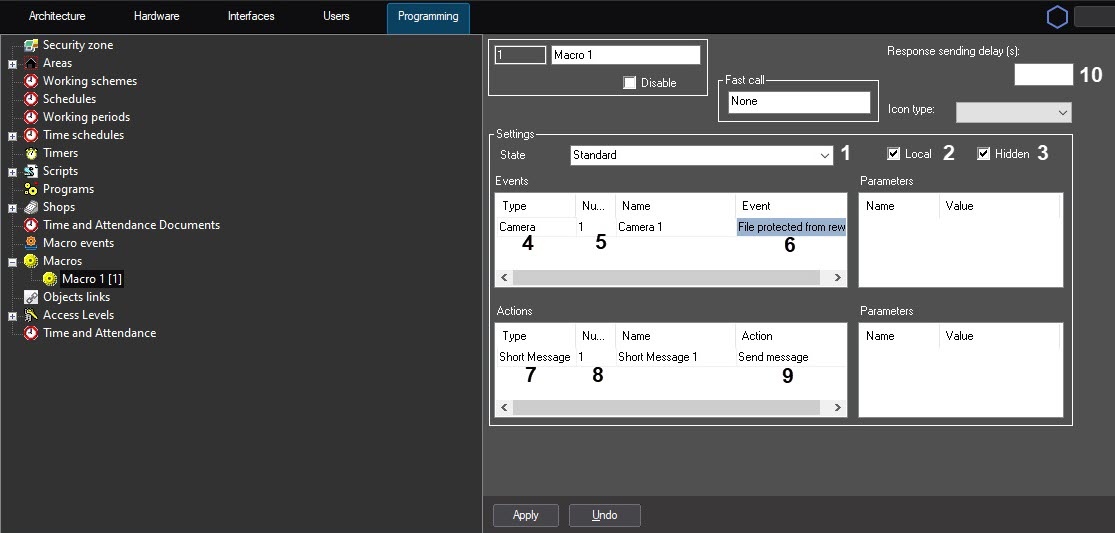
Macros are used to automate the work of the Operator. In Axxon PSIM, macros help to inform the Operator/administrator about software and hardware failures, automate the backup archiving process, and much more.
Let’s consider an example of a macro that generates an SMS and sends it to the specified phone number. A message is sent if a condition is met—an error occurs when video from Camera 1 is written to a disk.
To create a macro for sending a message, do the following:
If the Hidden checkbox isn't set (3), you must start a macro manually. To do this, click the Run button in the Main control menu and select a macro from the list (2).
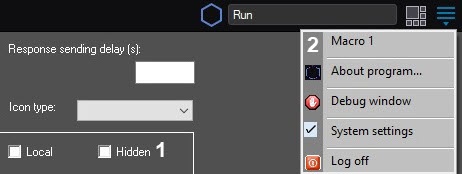
You can also open the menu by left-clicking the |
If a macro is force run, there is a checkmark next to the macro name in the list of the Run menu on the Main control panel.

You can also run macros from the Map or Surveillance window (see Operations with macros and Running macros from the Surveillance window). |
 icon in the Windows notification area (system tray), or by briefly pressing the F8 hotkey.