

A window for connecting to the OPC server opens.
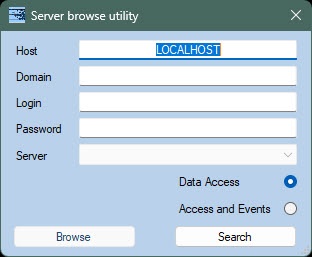
- Manually: specify all field values to establish a connection to a locally installed OPC server.
- In the Domain field, specify the name of the domain to which belongs the user who has permission to search for OPC servers.
If there is no domain in the system, or you need to select a user who doesn't belong to any domain, the Domain field must be left blank.
- In the Login and Password fields, specify login and password of the user who has permission to search for the server.
If you don't specify authentication parameters, the search for the server is performed by the current system user.
- Select the OPC server standard by selecting the Data Access or Access and Events option.
- In the Domain field, specify the name of the domain to which belongs the user who has permission to search for OPC servers.
- Automatically: search for a locally installed OPC server by clicking the Search button.
Correct configuration of DCOM is required to search and connect to remote OPC servers.
A window for adding OPC objects opens.

You can set a checkbox next to the OPC server or a device. In the first case, all elements of all devices of the OPC server are selected. In the second case, all elements of only selected devices are selected. |
In the window that opens, set the checkboxes next to the elements of the OPC server that you want to add to the hardware tree.

The following settings can be applied to the selected elements of the OPC server:
If it is necessary to monitor the status of the elements of the OPC server, set the Monitoring checkbox.
You can enable the monitoring of the status of the elements of the OPC server later (see Configuring the monitoring of the elements of the OPC server).
- If it is necessary to assign the Data Access rules for the elements of the OPC server, select the corresponding rule in the Rule drop-down list (see Configuring rules for the elements of the OPC server of the Data Access standard).
You can select several elements of the OPC server at once using the keyboard shortcuts, for example: "Ctrl" + "a"—select all elements. "Shift" + left-click on the specified element—select all elements starting from the currently selected one to the one specified with the mouse click. "Shift" + keyboard arrows "down" or "up"—select the elements one by one going up or down from the currently selected one. |
Click the Apply button to add the elements of the OPC server to the hardware tree.
