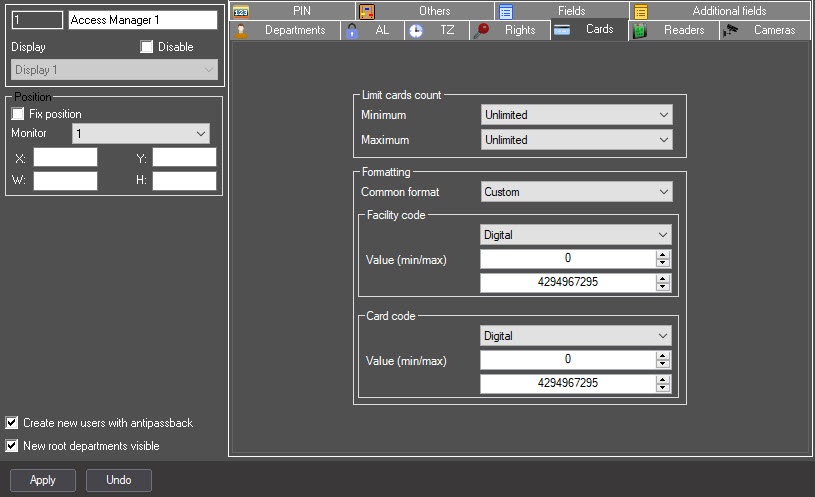
from 1 to 10—if the specified number of access cards is not assigned to a user, then this user cannot be saved in the Access Manager interface object.
Unlimited—an unlimited number of access cards can be assigned to a user.
Prohibited—user cannot be assigned access cards. Buttons and function menu for assigning access cards are inactive in the Access Manager interface object.

from 1 to 10—if a user is assigned more than the specified number of access cards, then this user cannot be saved in the Access Manager interface object.
Unlimited—an unlimited number of access cards can be assigned to a user.
Prohibited—user cannot be assigned access cards. Buttons and function menu for assigning access cards are inactive in the Access Manager interface object.
If at least one Minimum or Maximum parameter has the Prohibited value, the buttons and the function menu for assigning access cards in the Access Manager interface object are inactive.

If the following access cards restrictions are violated, user cannot be saved in the Access Manager interface object. |
Default—allows setting an arbitrary value for the facility code and card code. Any letters, numbers and characters are allowed except: <| >.
Wiegand26—allows entering a 1-byte facility code (from 0 to 255), and a 2-byte card code (from 0 to 65535).
Wiegand32—allows entering a 2-byte facility code (from 0 to 65535), and a 2-byte card code (from 0 to 65535).
Wiegand26 (code only)—the facility code cannot be set, only a 3-byte card code is set (from 0 to 16777215).
Wiegand32 (code only)—the facility code cannot be set, only a 4-byte card code is set (from 0 to 4294967295).
TouchMemory—the facility code cannot be set, only the 8-byte card code is set. The format is hexadecimal, characters A, B, C, D, E, F are allowed. The code must be 8 characters or longer. If the entered card code is less than 8 characters long, the the higher order digits are filled with zeros.
Hikvision—the Hikvision ACS format. It always has a fixed H character in the facility code. The card code is specified by a string with a maximum length of 32 characters.
Configurable—allows setting the parameters of the facility code and card code.
Fixed character—the specified single character is always hard-coded, which cannot be changed in the Access Manager interface object.
String—allows entering a string of 0 to 255 characters.
Numeric—allows entering only numbers from 0 to 4294967295.
Hexadecimal—allows entering numbers in HEX format (numbers and characters A, B, C, D, E, F) from 0 to 8 bytes long.
Fixed number—similar to Fixed character, but instead of a character, a number between 0 and 4294967295 is used.
Regular template—allows setting an access card template with specified restrictions, lengths and value ranges.
An example of some service characters for regular expressions:
- ^ is the beginning of the regular expression. A line opening.
- $ is the end of the regular expression. A line closing.
- . is any single character.
On the website https://regex101.com, you can find a complete list of service characters for regular expressions, as well as to check the accuracy of a regular expression.
Example 1:
For the facility code, it is necessary to limit the range of entered numbers from 1 to 3. The amount of numbers must be no more than 4. Other characters and numbers are not allowed.
Template:^[1-3]{4}$Example 2:
For a card code, it is necessary to limit the code length to 8 characters, at least 1 character for input. In this case, it is allowed to enter uppercase Latin letters A, B, C, D, E, F.
Template:^[(A-F),(0-9)]{1,8}$