Face search allows you to find all recognized faces in the archive.
To find all recognized faces, do the following:
- Set the search interval (see Setting a search interval).
If necessary, set additional search criteria by clicking the  button:
Gender: select the required option;
Age span: specify in years in the From and To fields.
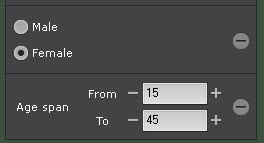
Saving information about gender and age to the database should be enabled in the detection tool settings (see Configuring Face detection). To delete a criterion, click the  button. button. |
Click the Search button.
Once launched, the search can be stopped at any time. To do this, click the Stop button which appears instead of the Search button. |
This starts a search for all recognized faces.
The search results panel will display video frames that contain recognized faces that match the search criteria. Recognized faces will be highlighted with a red frame:

To instantly export a face image from the frame, do the following:
- Click a face track in the surveillance window.
- Click the
 button.
The face image will be saved to the folder specified in the settings (see Configuring export options).