
To display the status of the camera input, select Show input in the context menu of the Surveillance window.
| You must first activate an object to display the status of its input. |
As a result, the status of the input is displayed in the Surveillance window.
| To hide the input status, select Hide input in the context menu of the Surveillance window. |
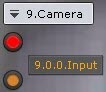
There are four possible statuses of a input.
Input status | Description |
| Camera is armed, input is in normal status |
| Camera is armed, input is in alarm status |
| Camera is disarmed, input is in normal status |
| Camera is disarmed, input is in alarm status |


